Running a Minecraft Server and more on a 1960s UNIVAC Computer
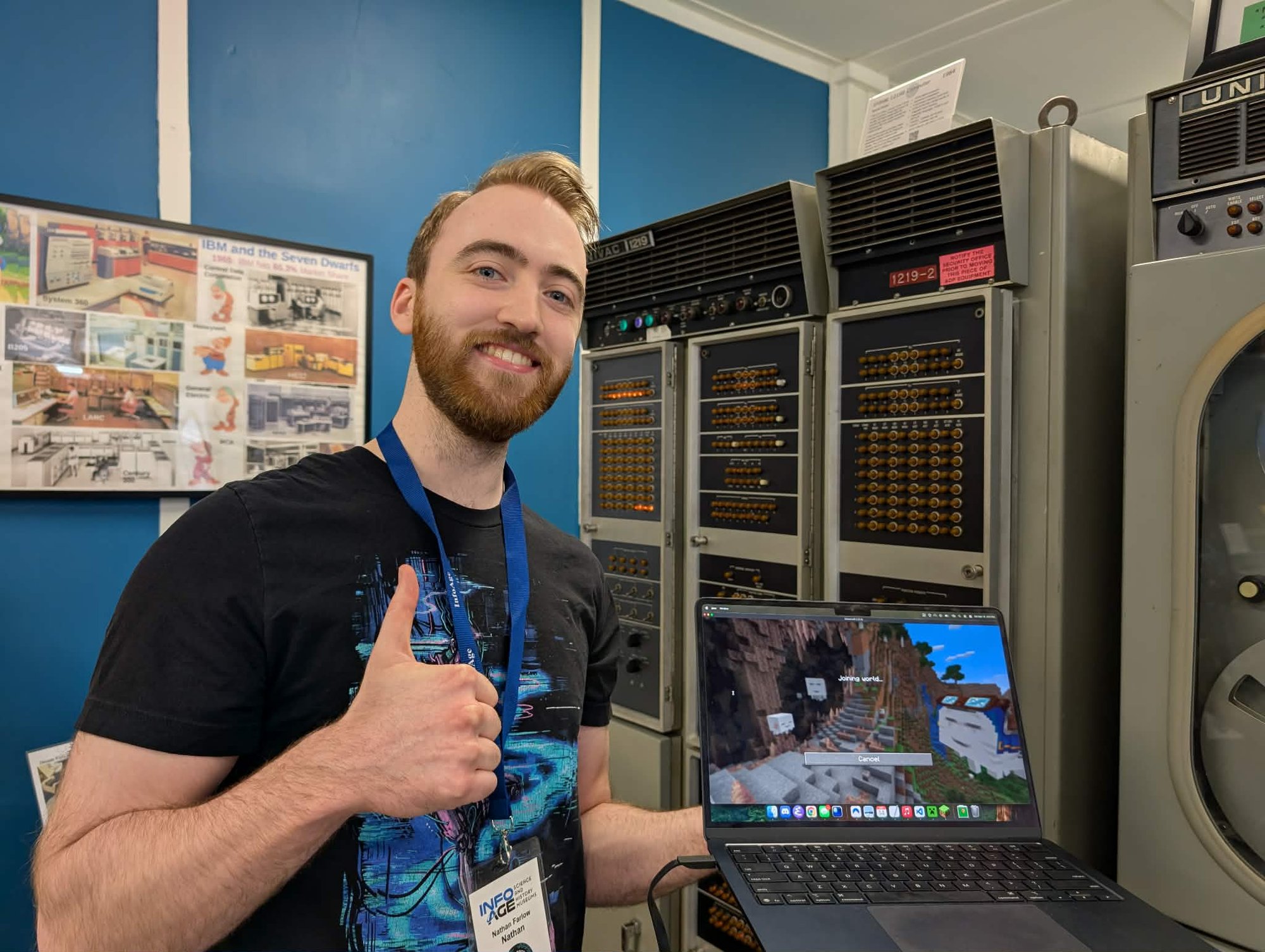
Check it out! Here I am running a Minecraft server on a 1960s UNIVAC 1219B computer:
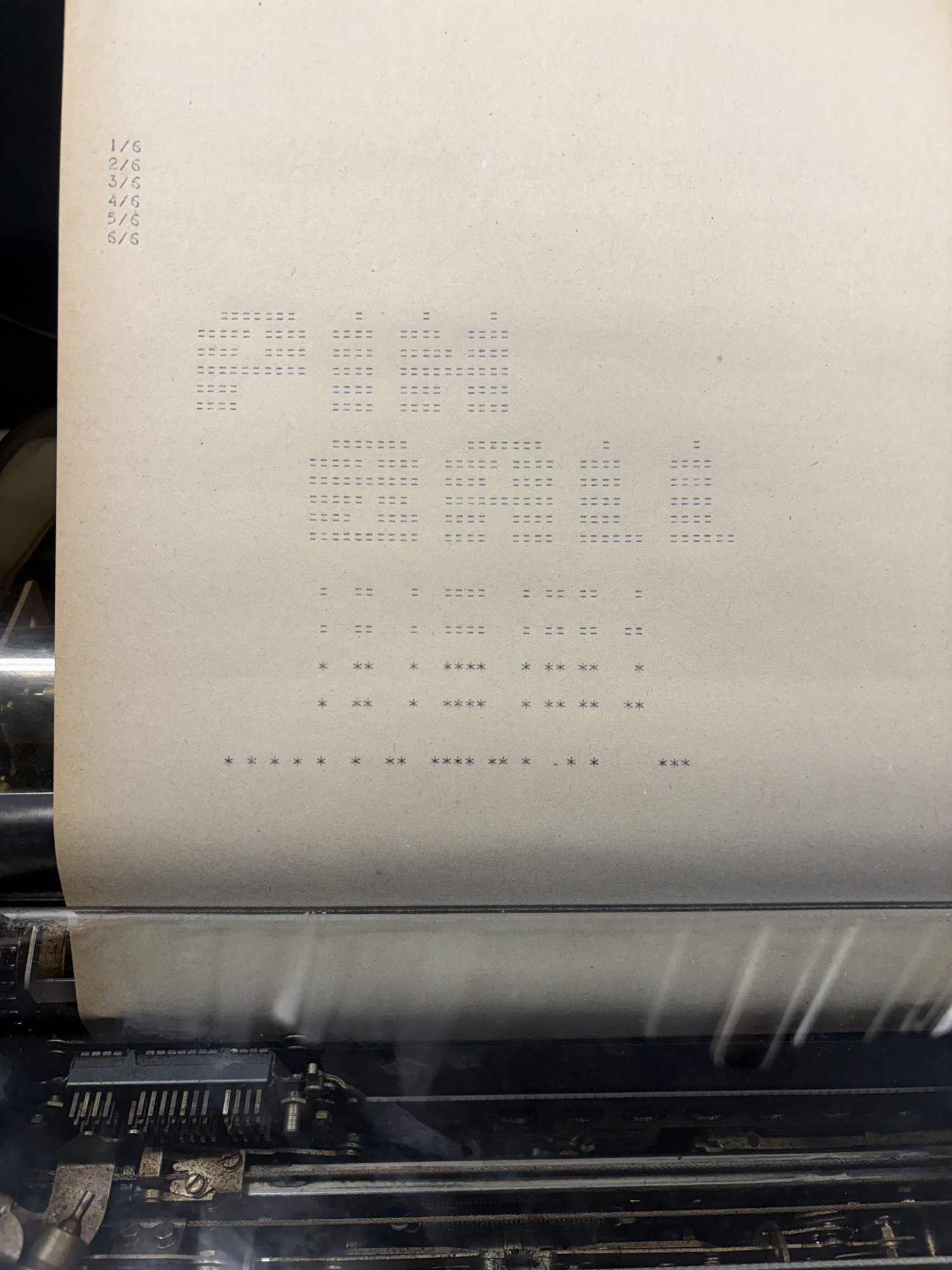
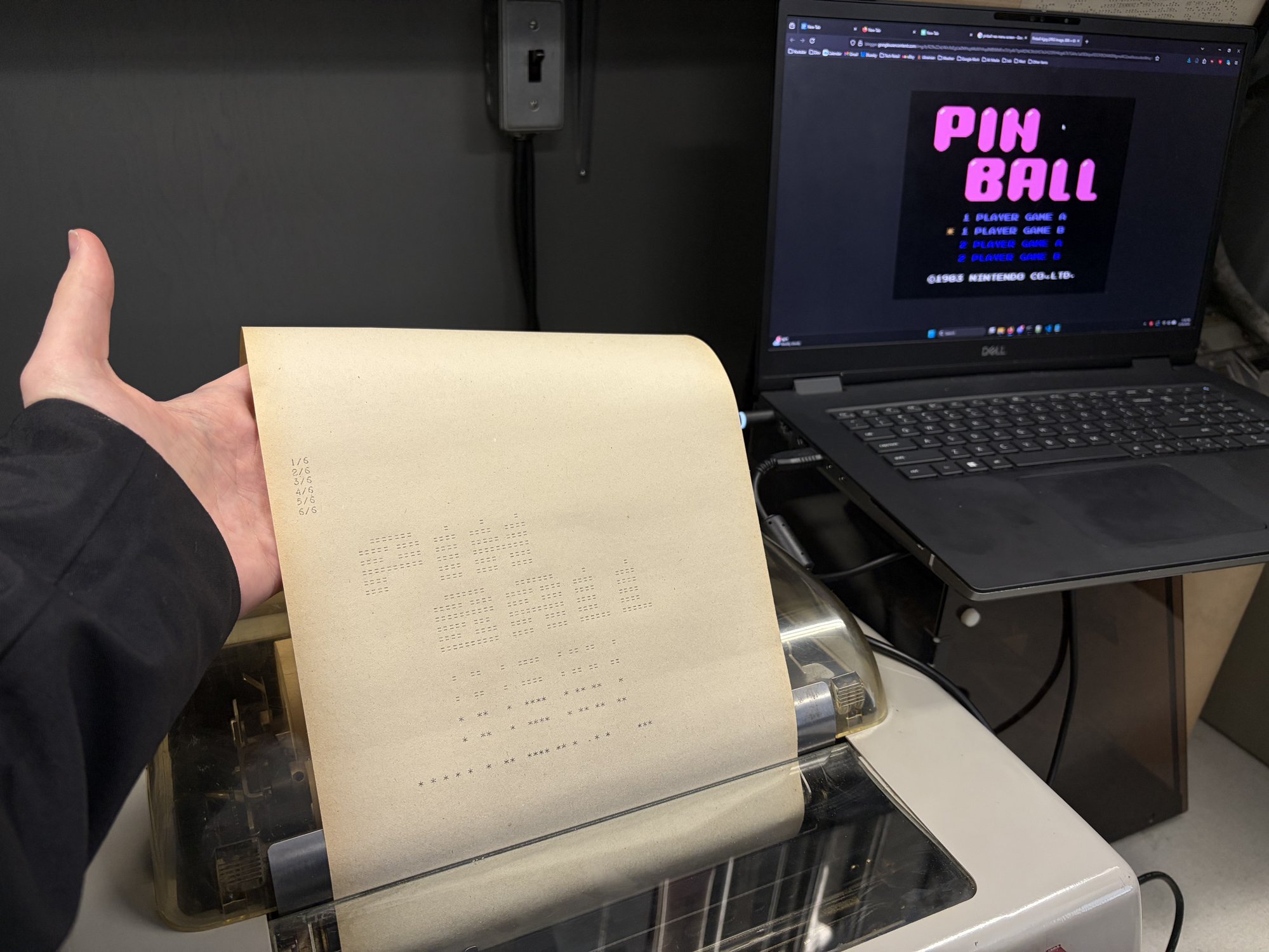
Here’s a NES emulator rendering the first frame of Pinball:
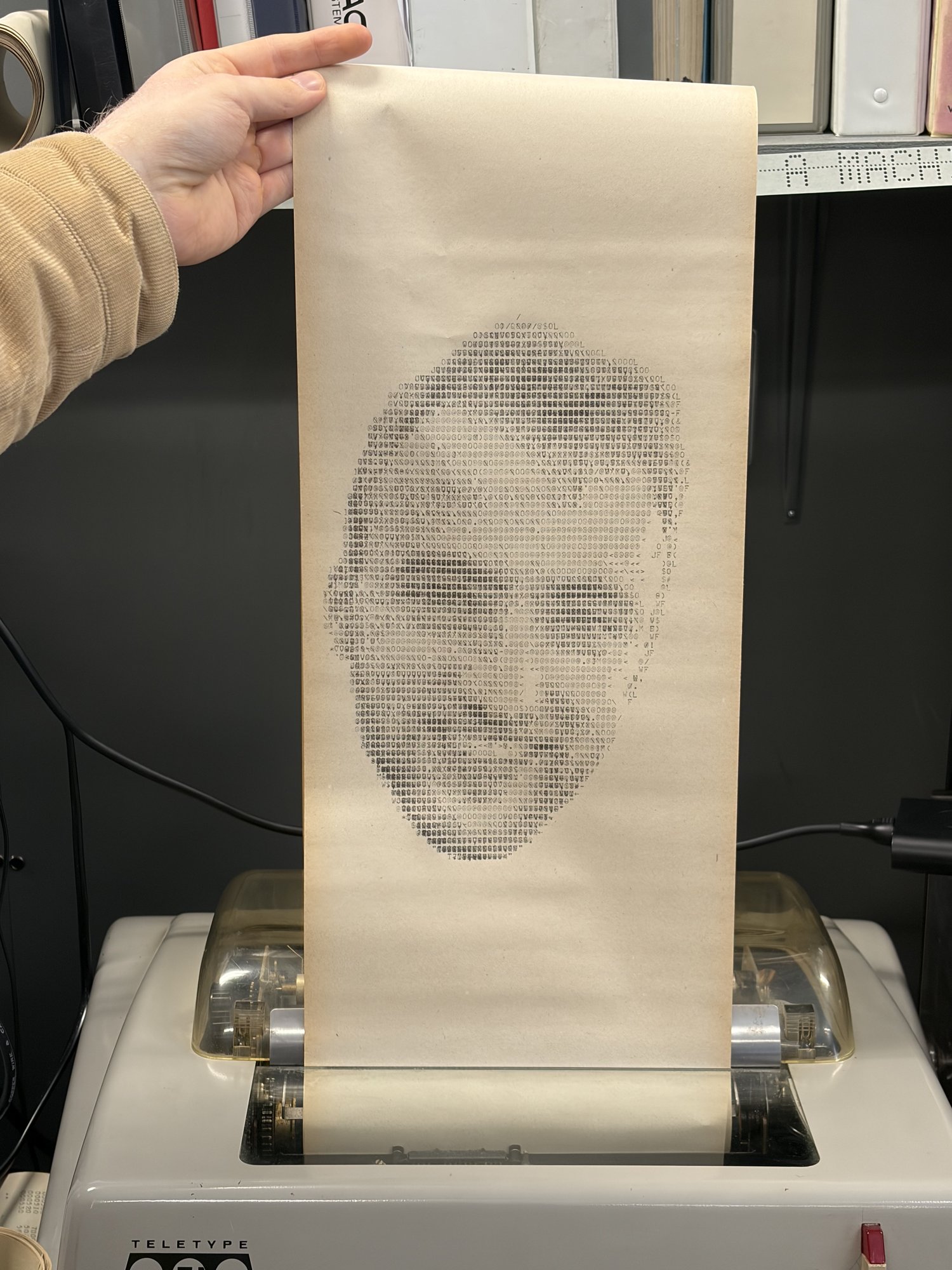
… and a selfie printed using the “overstrike” technique:
We ran a ton more crazy stuff, including:
- OCaml programs (!)
- A webserver
- Curve25519 + AES encryption
- A BASIC interpreter
- ELIZA
- Games like Oregon Trail, Wordle, and Battleship
… and so much more! All this on a 250khz computer with only 90kb RAM from the 1960s. I live for this kind of stuff! I’m obsessed with running code in weird places and smashing technical limitations. This project is my most ambitious project so far, taking about 8 months of work from myself and others.
The source for the project is here. Also see TheScienceElf’s video on this project!
The UNIVAC is a weird machine
The UNIVAC 1219B is a super weird machine and is hostile to modern programming in almost every way:
- 18 bit words. Memory addresses and values are 18 bits! Not even a power of two.
- Ones’ complement arithmetic, kinda. Modern computers use two’s complement to represent signed integers. This computer uses ones’ complement, but with annoying differences around signed zero that we had to reverse engineer.
-
Just a few registers. One 36 bit register
Acan be individually addressed byAU:AL. You get that and another 18 bitBregister. - Only 40,960 words of memory. That’s only 90kb total memory to split between our code and the memory it needs at runtime.
- Banked memory. These 40,960 words of memory are split into 10 banks. You have to configure which bank your instructions address in advance.
The computer’s original purpose was to be used by the Navy to read in radar signals and direct artillery. It really is an amazing feat of engineering. The computer is shown on the left in the image below. To its right is the (currently semi-functional) magnetic tape unit.
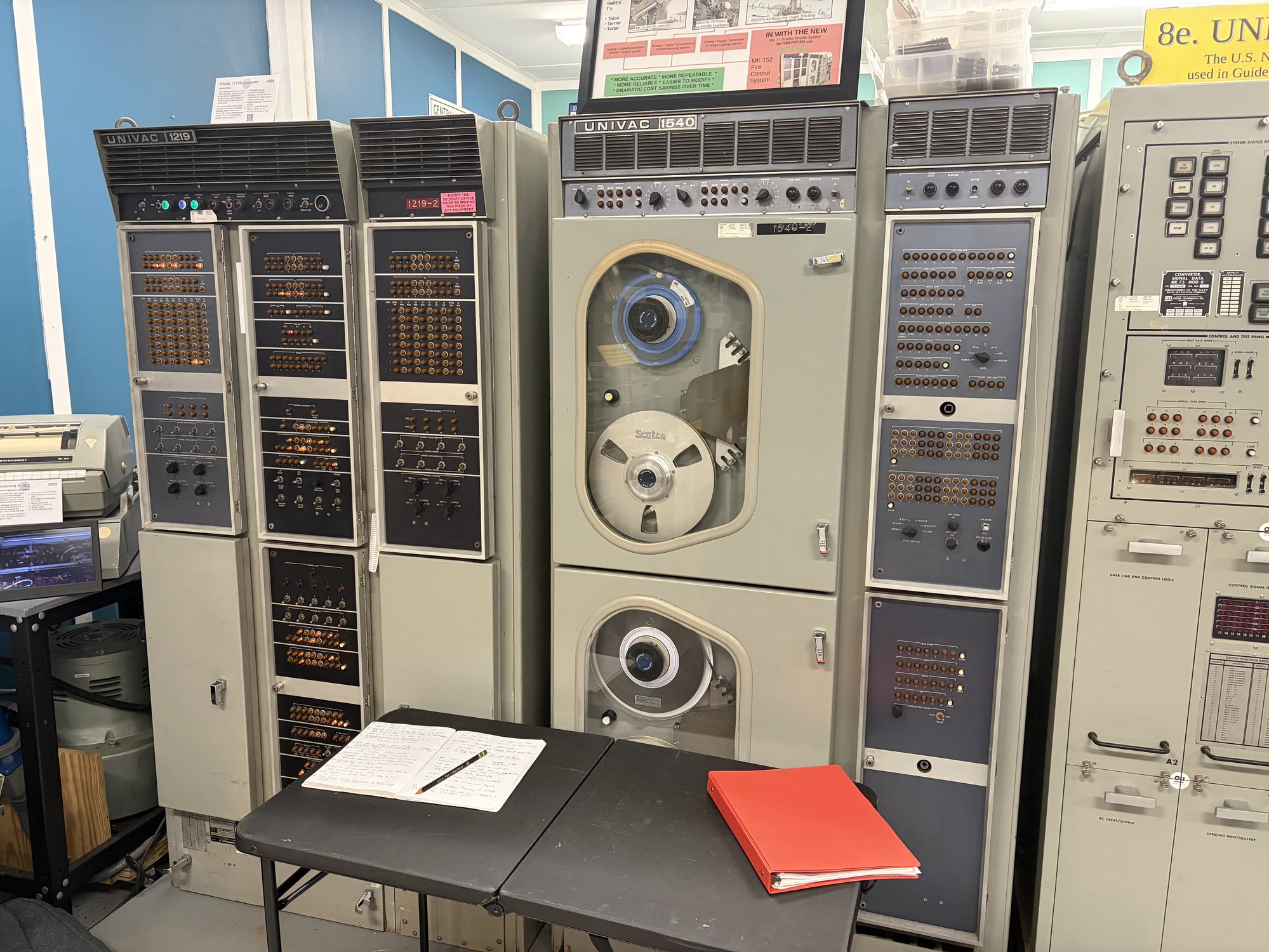
Nearby is the teletype, which is how we interface with the computer. You can type to the UNIVAC and it can type back; everything is printed to the same sheet of paper. It’s the stdin and stdout.
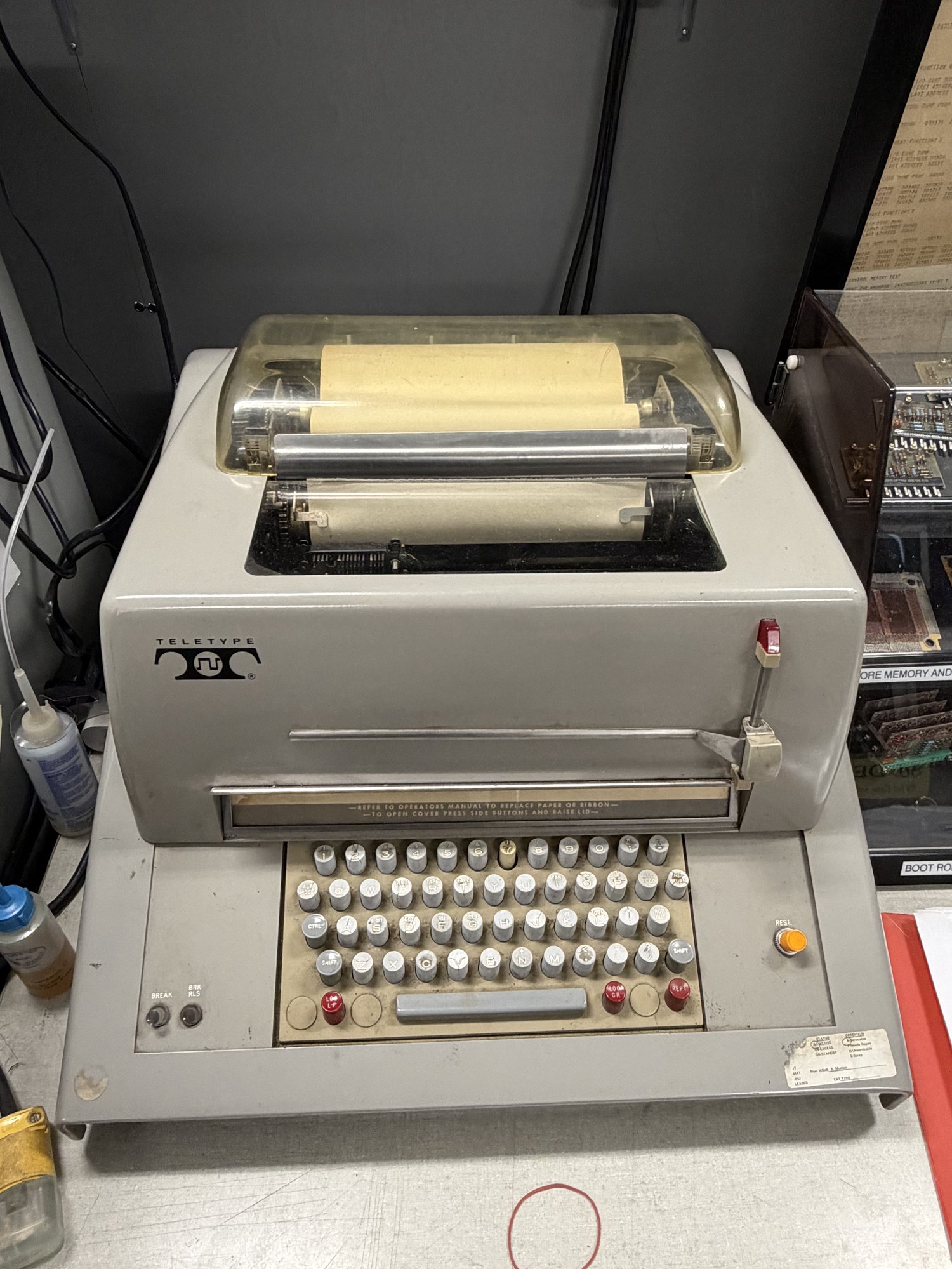
Only two UNIVAC 1219s exist today, both rescued from Johns Hopkins University by folks from the Vintage Computer Federation. This is the only one that is operational.
Before we started this project, all the programs that existed were hand-written in UNIVAC assembly. We’re going to change that by getting C compiling!
The first encounter at VCF East 2025
The first time I came across the computer was during a trip to VCF East in April 2025. Bill and Steven were running demo programs on the machine. Duane, Bill, and Steven had done a ton of amazing work to rescue and restore this computer over the last 10 years.
Seeing this thing in person was genuinely inspiring: the flashing lights, the tacking of the teletype, the smell of the oil… I knew then that I needed to get some crazy code running on this thing. Something much more than fizzbuzz. I wanted a NES emulator. I wanted OCaml. How far could we push this hardware?
We need an emulator and assembler
The first things we need are an assembler for the UNIVAC assembly language and an emulator to run that assembled program. Luckily for us, Duane had written an assembler for UNIVAC assembly in BASIC (!) and an emulator in VB.NET many years ago.
Soon after VCF was over, TheScienceElf took a stab at writing a new assembler and emulator in Rust by consulting the scans of the incredible manuals and using Duane’s implementations as a reference.
The Rust emu was fast. It was 400x faster than the real UNIVAC hardware and 40,000x faster than the VB.NET emulator. This speed turned out to be entirely necessary to power the fuzz testing I’ll discuss later.
Both emulators weren’t hardware accurate at this point, but it was good enough to start!
Wee as a first attempt at a C compiler
Now that we have an emulator, how can we get C code running in it?
The fastest way to prove out a C compiler was to use wee, an old project of mine. It’s a tiny instruction set I’ve used previously to compile C to weird places.
It worked, but holy moly it was bad. A trivial fizzbuzz program took up ~27k words, or about 67% of the total memory of the computer. It took a full minute to compute the first 100 fizzbuzz lines. Since my goal was to get real and complex programs running, this was clearly not viable.
A RISC-V emulator is the move
We have to do something smarter than wee. There are many options, so let me clarify my main two goals:
- I want to run real, big, interesting programs. I want to compile straight from github and let it rip on the machine. It’s less important that these real programs run maximally fast.
- I must maintain my sanity.
We need to use a real compiler, like LLVM or GCC
I need all of the following to accomplish the goal of running real programs:
- Full C standard library. In this case I used picolibc.
- Soft float and other legalizations. I need all the types and operations to work. Floats, doubles, int32, int64, everything. Even though the UNIVAC doesn’t have hardware to do this natively.
- Dead code elimination + size optimization. We need to pack things tightly into 90kb of space.
- Other languages. I want to support more than C, like Rust, C++, Zig, etc.
Directly compiling to the UNIVAC won’t cut it
Writing an LLVM or GCC backend for the UNIVAC would be absolutely nightmarish and would violate my second goal to maintain my sanity. The ones’ complement arithmetic, 18-bit words, and banked memory would all be painful to hack into modern compilers.
And even if we did, to actually benefit from direct compilation, your C ints would be 18-bit ones’ complement ints. That’s technically allowed by the C spec (at least until C23 mandated two’s complement), but in practice, real code often assumes >=32-bit two’s complement, so off-the-shelf programs would break.
So emulate a target GCC already supports, like RISC-V
The idea is to use GCC to compile C to RISC-V, and then emulate that RISC-V on the UNIVAC by writing a RISC-V emulator in UNIVAC assembly.
Think about how nice this is:
- One and done. Write the emulator once and never look at UNIVAC assembly again.
- You can fuzz it. You can have high confidence that the emulator is correct by generating random RISC-V programs, running them through the emulator and a reference emulator, and comparing the final state of the registers.
- Incremental dopamine. I read a blog post many years ago that stuck with me about structuring projects in a way that gives incremental dopamine throughout the implementation. If you try to write the whole project and only test things at the end, you may burn out before you’re positively rewarded by seeing something work. The base RISC-V instruction set has only 38 instructions we care about, which means there’s a clear end goal. We can check them off as we implement them and they pass the fuzz tests.
- Dense binaries. We can encode a RISC-V instruction efficiently into 2 18-bit UNIVAC words to efficiently pack them into our limited memory. This also reserves us the option in the future to implement the compressed extension or add additional bespoke compression methods.
Emulation is slower, but that’s fine
The real downside of this approach is the runtime penalty to decode and emulate each instruction. After all the optimizations, it takes ~40 UNIVAC instructions to emulate 1 RISC-V instruction. That means that our 250khz UNIVAC computer can run a ~6khz RISC-V computer.
… and that’s pretty good! The real obstacle to running real, complex programs is that 40kw of memory. This emulation gives us the best space efficiency along with its other benefits.
Building the toolchain
Here’s the high level flow of the toolchain:
- Write C.
- Compile to RISC-V with GCC.
- Re-encode each instruction into a UNIVAC-efficient format, 2 words per RISC-V instruction.
- Append these re-encoded instructions to the emulator’s source.
- Assemble the program into a
.76tape file to be loaded onto the machine.
Writing ~1000 lines of UNIVAC assembly for the RISC-V emulator isn’t going to be easy; you have to have good tooling before doing this. Before I ever started writing this program, I spent a couple weeks preparing:
- An emacs major mode.
- OCaml tooling for parsing, emulating, and re-encoding RISC-V, with round-trip fuzzing.
- Differential fuzzer that checked my UNIVAC RISC-V emulator against a ground truth (mini-rv32ima).
- Efficient test case reducer (using a port of Lithium).
And oh boy this investment paid dividends.
Claude Code can’t write UNIVAC assembly yet
Claude Code is great – it wrote the entire emacs major mode for me given the instruction docs. I use it frequently for code editing tasks as I write OCaml. To my dismay though, even with the docs, emulator, and differential fuzzer, Claude Code fell on its face when writing UNIVAC assembly. I can’t really blame it. UNIVAC assembly is just really weird.
No matter what I did, at this point of the project, Claude Code could not
internalize the UNIVAC’s idiosyncrasies, like its ones’ complement arithmetic,
the fact that left shift is circular and right shift is arithmetic, and the
weird instruction special cases, like CPAL behaving differently with 0.
I can write UNIVAC assembly, though
There are moments in all programmers’ lives where you have to just lock in and grind it out. So I rolled up my sleeves, and in a matter of a few days, I typed the ~1000 lines of UNIVAC assembly to implement the 38 RISC-V instructions we needed from the base set. It was honestly an enjoyable experience!
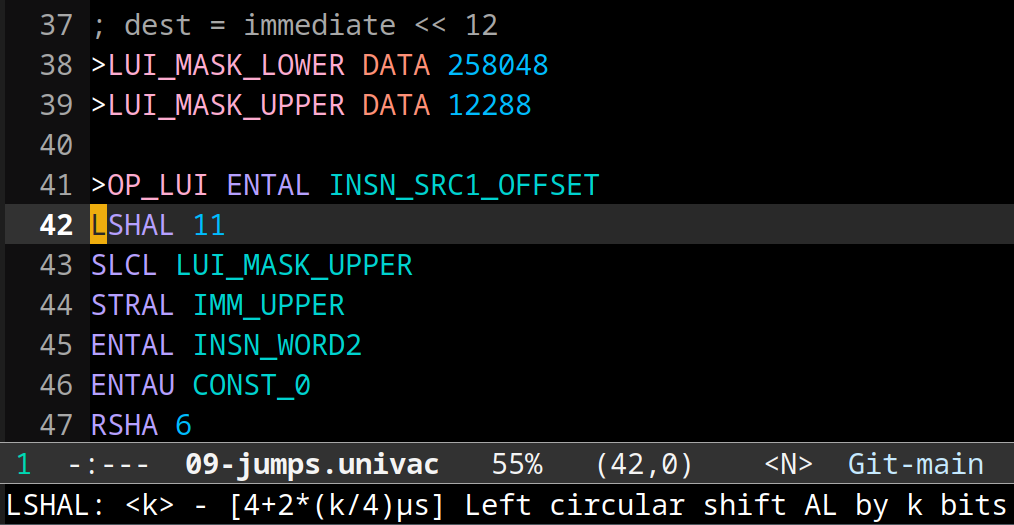
The emacs major mode enables syntax highlighting and provides help text that shows the timing of the instruction.
The fuzz testing caught bugs and reduced them to a minimal repro instantly. Once the fuzzer passed for an instruction, I happily moved on; I didn’t care about efficiency at this point, just correctness.
The first C program works!
Once all the fuzz tests were passing, I ran my first C program. It…. almost worked! There was a small bug in how RISC-V memory addresses translated to UNIVAC memory addresses. I updated my fuzzer so that it would catch the bug, fixed it, and all the C programs just worked from that point on! I thanked my past self profusely for writing the fuzzer.
This was an amazing moment. Fizzbuzz worked. A BASIC interpreter worked. Even
smolnes, a NES emulator, was working!
…the only catch is that it would take 20 hours to render the first frame of Pinball on the real computer (3 minutes in the emulator). We don’t have 20 hours to wait at the museum unfortunately, so is the NES idea doomed?
Not even close; we just have to optimize the hell out of this thing.
Now make it 30x faster
Our UNIVAC emulator keeps track of the total time it would take to run the programs on the real machine. This gives us a number to optimize against.
There were two numbers I focused on optimizing:
- The runtime of all fuzzed programs, which gives a good average metric across all instructions
- The NES demo, a representative benchmark I actually cared about making as fast as possible
Move work from runtime to encode time
The most important optimization of all is to re-encode the RISC-V instructions into a format that’s maximally efficient for the UNIVAC. A RISC-V instruction is 32 bits. Our re-encoding takes this 32 bit instruction, does some transformation, and writes the result into two 18 bit words for the UNIVAC emulator to use.
I was blown away when I read the RISC-V spec and learned how it encodes immediates: the bits are scrambled within the instruction!
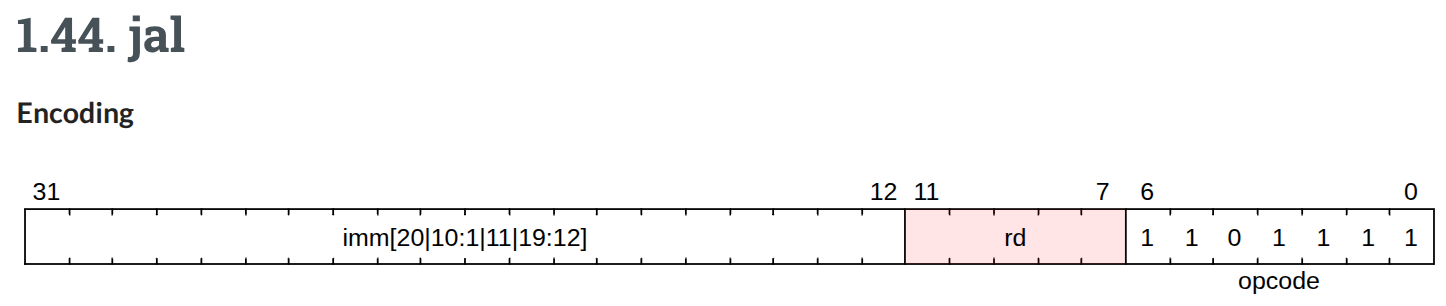
...huh? (source)
You need to spend a ton of cycles bit shifting and masking in order to reconstruct the immediate in your software emulator. Apparently this is convenient and efficient for hardware implementations? We can’t spare those cycles though, so the obvious idea is to unscramble the bits ahead of time and write them down in the right order in the re-encoding we give to the UNIVAC emu.
It’s the same story for the opcode. Deciding on how to emulate a RISC-V instruction can sometimes require you to check various non-contiguous bits in the instruction. Our encoding just assigns a convenient opcode number to each instruction.
Beyond unscrambling immediates, if there is anything that an instruction
handler does immediately, bake that into the instruction directly. For example,
some handlers need to immediately compute immediate * 2. May as well just
store immediate * 2 instead of immediate.
The most extreme version of this are the SRLI and SRAI instructions. On the
UNIVAC, we can’t shift by a variable amount. The solution is to dynamically
create a shift instruction at runtime in a self-modifying-code-like way, and
then execute it. But the work of creating said UNIVAC instruction can actually
be done ahead of time! For SRLI/SRAI, we straight up package a UNIVAC
instruction directly in the payload to later be extracted, written to RAM, and
executed.
These transformations technically mean that we lose the ability to support RISC-V programs that depend on self-modifying code. But that’s a fine tradeoff for this massive speed gain.
Make the hot path faster
Classic optimization ideas still apply on the UNIVAC:
Delete dead code. A clever thing I did here was repurpose my test case minimizer to delete as many UNIVAC instructions as possible from the emulator such that the fuzz tests continued to pass. That found code I could just delete!
Jump tables. The most efficient instruction dispatch method turned out to be jump tables based on the opcode.
Instruction reordering and register liveness. The fewer times you have to store and reload registers to/from memory, the better.
Inline code. Subroutine calls have jump + return overhead; inline small functions to skip that.
Add an OCaml macro system to manage inlining
Inlining code buys you speed but will become unmaintainable if you don’t have a macro system to save you from copy + pasting code all over the place. I wrote a simple OCaml macro system: any OCaml you write between triple backticks can inject contents directly into the file. How fun 🐪
Here’s an example of reducing code duplication:
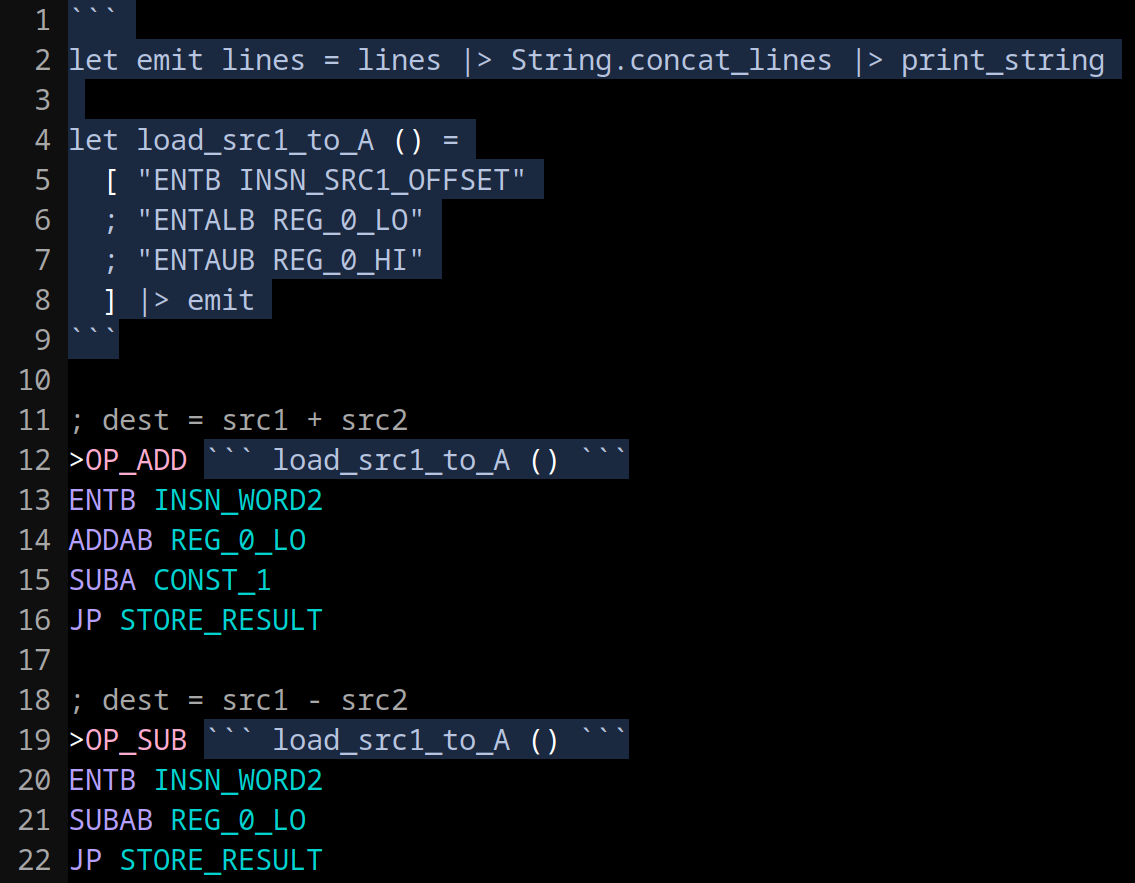
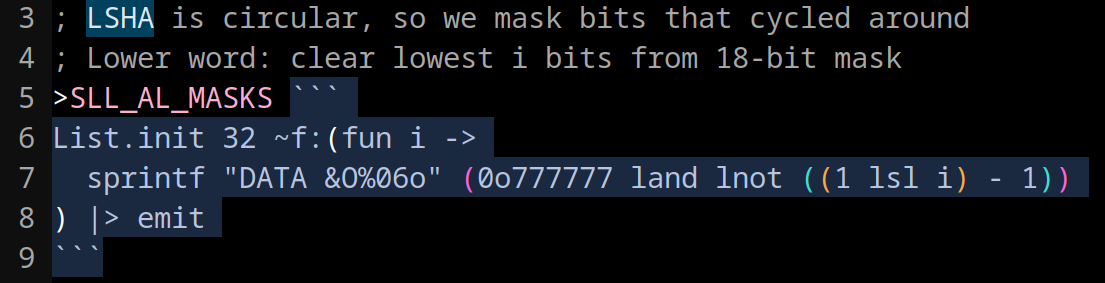
And here’s an example where I use OCaml to generate a lookup table with 32 entries:
Add some fast syscalls, use good compiler flags
Most of these C programs have global variables we need to set to 0 at startup in
the .bss section. That takes time, so I add a memclear syscall that will do
this quickly in UNIVAC assembly to optimize startup time.
I also added a .noinit linker annotation to opt some big global buffers out of
.bss initialization that didn’t really need it.
On the compiler flag side, -O3 does help speed things up, but not drastically
compared to -Os. The UNIVAC lacks fancy hardware like caches, branch
predictors, and the like for compilers to take advantage of.
Claude Code micro-optimizes massively in parallel
Having both a comprehensive fuzzer and a numeric metric to optimize against is a perfect environment for LLMs to do great work on a project.
There was a ton of low hanging fruit in my initial implementation around instruction reordering, dead code, etc. I had a Claude Code workflow that spawned 10 subagents in parallel, each in its own worktree, to independently explore and test different optimization ideas.
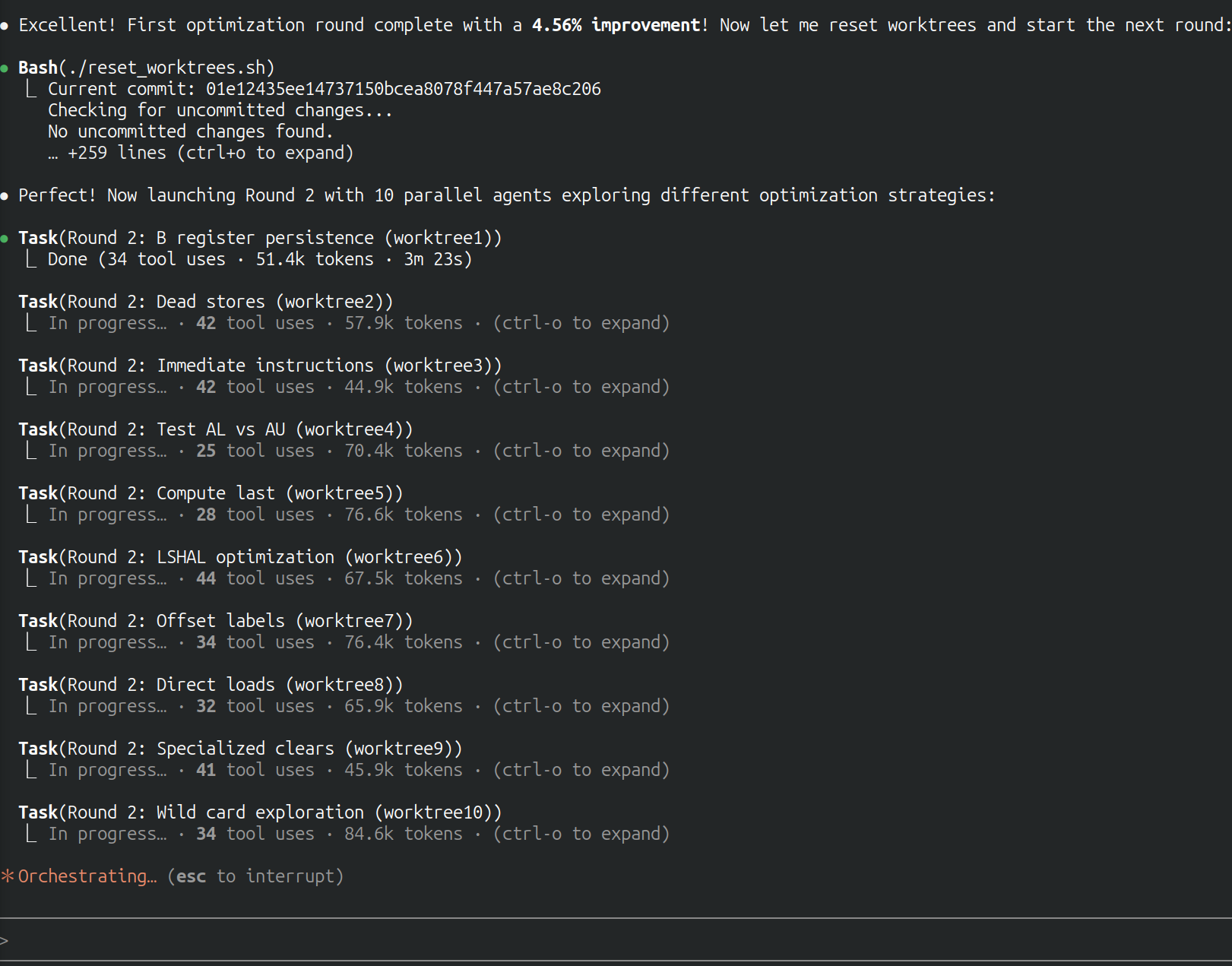
10 Claude Code subagents trying to optimize the emulator in parallel.
The main agent would merge them together assuming they met some criteria I wrote about maintainability/quality. (Don’t just inline everything, pretty please). I’d look at the final result and weigh the complexity-maintainability tradeoff before merging.
This worked well! After many iterations, I got a ~20% total speedup from this method alone.
I had to strengthen my fuzzer a couple times when the LLM would break something and the fuzzer didn’t catch it. I’d like to propose Murphy’s law of vibe-optimizing:
When LLMs optimize a program, in the limit, if any part of the system is not codified by tests, there will be a bug introduced there.
Claude Code writes the multiplication handler in Python
Another way we could get big speedup on some C programs is to implement the multiply instruction in our emulator. The base RISC-V instruction set doesn’t have multiply; the compiler can work around it by emitting adds and shifts.
I set Claude Code on the job, but this is a big ask. We need to emulate two’s complement 32 bit multiplication with weird 18 bit ones’ complement operations. Even with fuzz testing, the ability to trace the program execution, docs, 1000+ lines of high quality example asm, and many parallel attempts, Claude Code still failed.
That’s when I had the following idea: for each of the UNIVAC arithmetic instructions, implement them as Python functions. Then, ask Claude Code to write a Python program that emulates 32 bit multiplication with these functions. I’ll give it some fuzz tests, too.
The motivation here is that:
- Claude Code is more familiar with Python
- It can write nested expressions rather than simple asm statements
- It can assign results to variables and write helper functions
- It can use standard Python debugging techniques
Sure enough, with enough parallelism and time, it was able to write this Python script!
I then prompted the simpler task: translate the Python program to UNIVAC assembly. And it worked!
The multiply handler is 676 lines of inscrutable UNIVAC assembly, making up ~43% of the entire emulator. It’s a gross monstrosity, but it offers a 6x speedup for multiplication-heavy programs like primality checking and elliptic curve crypto, so it stays for now.
30x speedup
All in, NES frame time dropped from ~20 hours to ~40 minutes (30x speedup!). This was finally short enough that we could run it at the museum over lunch.
Share the good news!
It was about time TheScienceElf and I reached out to Duane, Bill, and Steven to tell them what we had done. We hadn’t really talked to them since our visit, and since I had already sunk so much time into this project, I suddenly worried what I’d do if the computer had broken since the last time we talked.
I sent the email off and announced our UNIVAC 1219 Rust emulator, the C toolchain, and the fact that we could run real programs. So, can we visit the museum and try it out?
Everyone loved it! We made a plan to visit the museum in January.
In the weeks leading up to our trip, Duane was a massive help on technical questions given his 25+ years of UNIVAC experience. He answered questions about the computer’s ones’ complement edge cases, the IO channel setup, TTY character encoding, the bootstrap loading process, and much more. Thank you Duane!
Museum Visit #1: Hardware debugging and loading code
The day finally came. TheScienceElf, Steven, Bill, and I rolled up to the museum on a January morning. Duane was on call remotely. We booted up the UNIVAC, but there was trouble. The WAIT light came on.
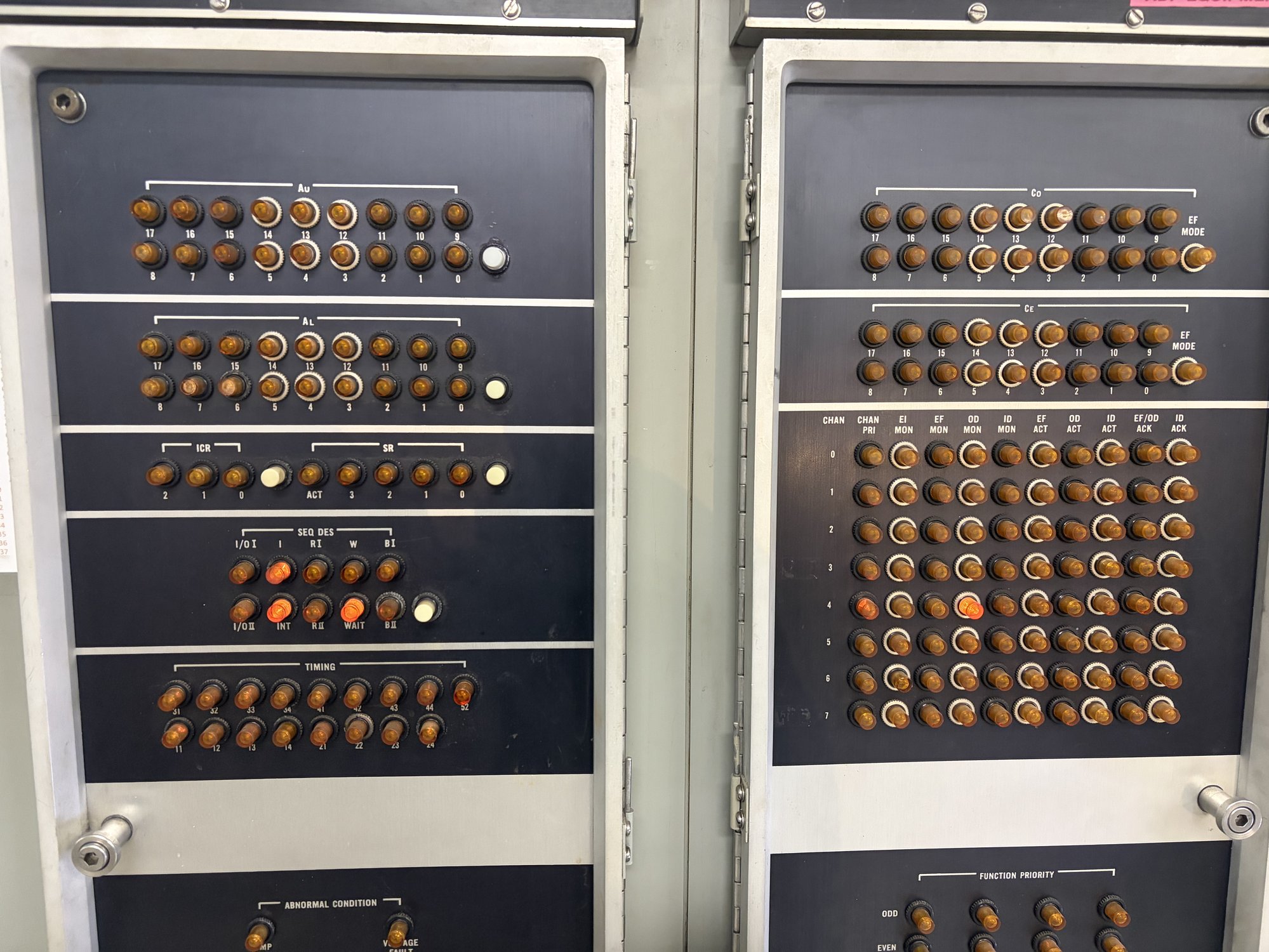
WAIT light is on due to spurious activity on channel 4.
The computer refuses to execute any instructions when the WAIT light is on. Apparently this has been a known issue for a while; the strategy in the past was to wait until the machine warms up for it to go away. After we waited 30 minutes and the light was still on, we were giving up hope. We gave Duane a call for help. Bill, Duane, and Steven traced the circuits in the manual and decided to disconnect IO channel 4 altogether. That worked! No more interrupt light! We think channel 4 had some bad hardware that was causing spurious activity and therefore interrupts.
Now for the fun part: we need to figure out how to load our programs. The usual way this works is to:
- Manually push buttons and levers on the front panel to program in ~30 instructions into the computer memory. This is the paper tape bootstrap program, capable of loading a program from the paper tape reader.
- Next, load the
LECPACroll of tape into the tape reader.LECPACis a utility program that has useful debugging and program loading features. - Push some buttons and flip some levers to configure
LECPACto read from channel 7, the serial IO channel. Duane did amazing work to develop a Teensy project that converts the UNIVAC’s parallel IO interface to serial so that we could connect our computers and send/receive data. - Run the
LECPACloading routine to read our program in from serial!
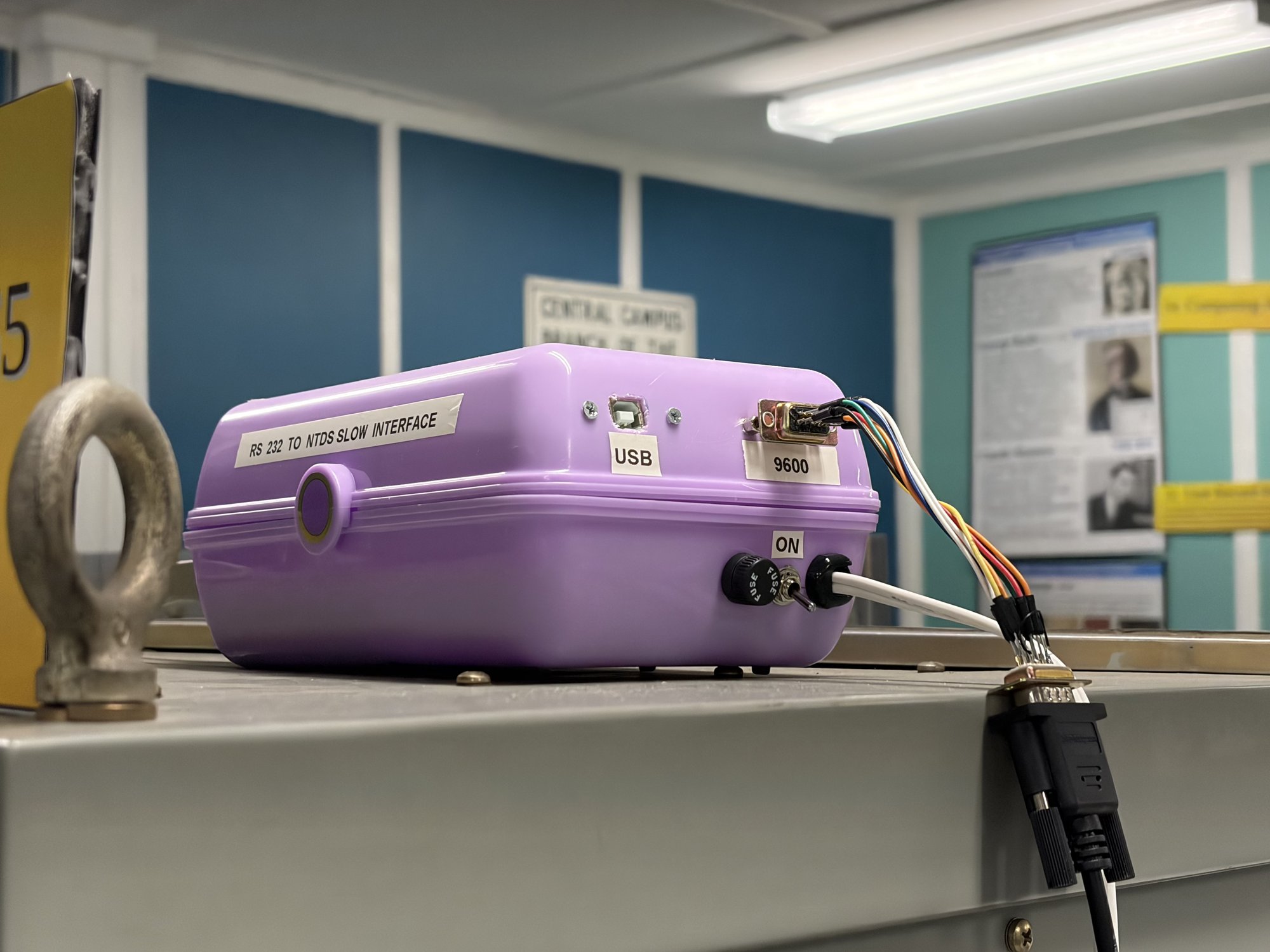
Duane's UNIVAC IO <-> serial adapter. A Teensy gives us a regular serial port so we can talk to the UNIVAC from our laptops.
But we were having trouble with step 4: we were just loading garbage data. We tried every permutation of USB cable, serial cable, and laptop we had. Nothing was getting through.
Duane emailed us a small program, only 8 instructions, to debug the serial input. We keyed it in by hand using the front panel. The program would wait for a character on the serial channel and display the result in the accumulator, whose value would then be shown in the lights on the front panel.
We used this program to experiment with different serial configurations until we
sent the letter “A” and saw the correct value appear in AL. And we found the
serial configuration we needed!
We loaded “Hunt the Wumpus”, a known good program written by Duane, to test the loading process over serial with our laptop. It worked! But when we tried to load our own programs from our toolchain, they failed to load. Why??
We diffed our tape files against Wumpus and realized we needed to pad the beginning of our tape file with zeros… for some reason. With that fix, our programs loaded into memory successfully!
Now for the moment of truth. We set the PC register to the start address of
our C “hello world” program, hit the run switch, and…. nothing. The program was
stuck for some reason that we didn’t understand. We loaded up another of our
programs, a program to compute pi, and started it. Instead of printing pi, it
printed a random sequence of garbage:
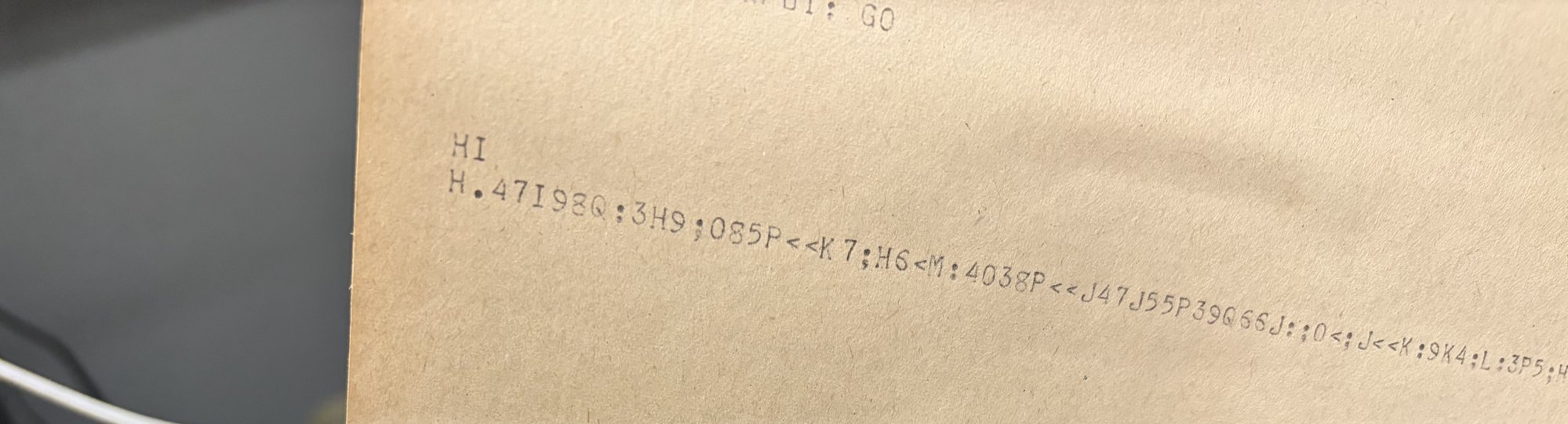
Definitely not pi.
We used the front levers to step through about 20 instructions and compared against our emulator trace. It was looking good, but after spending all day on the hardware and loader, we ran out of time to find the divergence. We used LECPAC to take some core dumps for offline analysis and called it a day. (A real core dump! This thing actually uses core memory!)
What a great success though! We fixed a hardware issue and figured out how to load our programs. The next time we come back, it will be all software debugging, and that’s what I’m best at.
Fuzzing and tracing to get the emulator matching the hardware
We scheduled another trip for a month out. How can we prepare in the meantime? If the computer is just spitting garbage at you, what do you do?
We need to gain confidence that our Rust emulator matches the hardware. This is when I wrote some of my favorite programs of all:
A fuzzing program generates instruction “fingerprints”
I wrote a diagnostic program in UNIVAC assembly that takes each arithmetic
instruction (ADDAL, ADDA, SUBAL, SUBA, etc.), runs it hundreds of times
with pseudorandom inputs, accumulates the results into a hash, and prints the
hash to the teletype. The hash is a fingerprint for the instruction’s behavior.
If you run the same program on two different implementations, matching hashes
mean the implementations agree. Different hashes mean there’s a divergence
somewhere.
The output is one opcode per line, each followed by its octal hash:
ADDAL: 614424 223254
ADDA: 020656 635560
ADDAB: 401323 107167
SUBAL: 633336 720540
SUBA: 235365 124723
...
That’s all well and great, but when the fingerprint differs, what do you do? Why did it differ? And on what inputs? You can’t know. That’s where the software tracer comes in:
A tracer to run UNIVAC instructions one at a time
This is the wildest program that I wrote. It’s a software tracer, written in
UNIVAC assembly, that runs another UNIVAC program instruction by instruction,
printing the full machine state (PC, instruction, AU, AL, B, SR, ICR) between
every step to the serial port. The idea is that we can diff this printout with
our emulated trace and identify exactly when and why the trace differed.
Exactly how to write this software tracer is a mind-bending challenge. In short,
the tracer maintains its own PC pointing into the target program. For each
step, it copies the current instruction from the target into its own memory. It
saves the full machine state, executes the copied instruction, then saves the
state again and prints the result. Some instructions, like jumps, have to be
modified to point to the tracer’s handlers, but the CPU still evaluates the jump
condition itself, so the tracer doesn’t reimplement conditional logic.
Here’s the tracer running over the first few instructions of an example program. Each row is the machine state captured before that instruction executes:
PC     INSN   AU     AL     B      SR     ICR
050000 340007 000000 000000 000000 000000 000000
050007 507300 000000 000000 000000 000000 000000
050010 507200 000000 000000 000000 000000 000000
050011 701234 000000 000000 000000 000000 000000
050012 100001 000000 001234 000000 000000 000000
050013 440003 123456 001234 000000 000000 000000
050014 460003 123456 001234 000000 000000 000000
050015 120001 123456 001234 000000 000000 000000
050016 140006 123456 123456 000000 000000 000000
050017 507200 123456 123555 000000 000000 000000
050020 360144 123456 123555 000000 000000 000000
050021 420003 123456 123555 000144 000000 000000
050022 507203 123456 123555 000144 000000 000000
050023 360310 123456 123555 000141 000000 000003
There’s actually nothing stopping us from making this an interactive program and hooking GDB up to the real hardware this way. It would be totally doable to set breakpoints, inspect memory, modify registers, single-step, etc.
Museum Visit #2: The first working programs
A month after our first visit, equipped with some legendary debugging programs, we made our way back to the museum. We need to start by proofing out the most basic primitives. Can we even print text to the teletype correctly?
We started with a handwritten “HI” program in UNIVAC assembly. It worked on the first try! Now it was time to run our instruction fingerprinting program. The fingerprints came streaming out, and sure enough, there was a difference from our emulator! The four 36-bit add/sub instructions were printing different fingerprints.
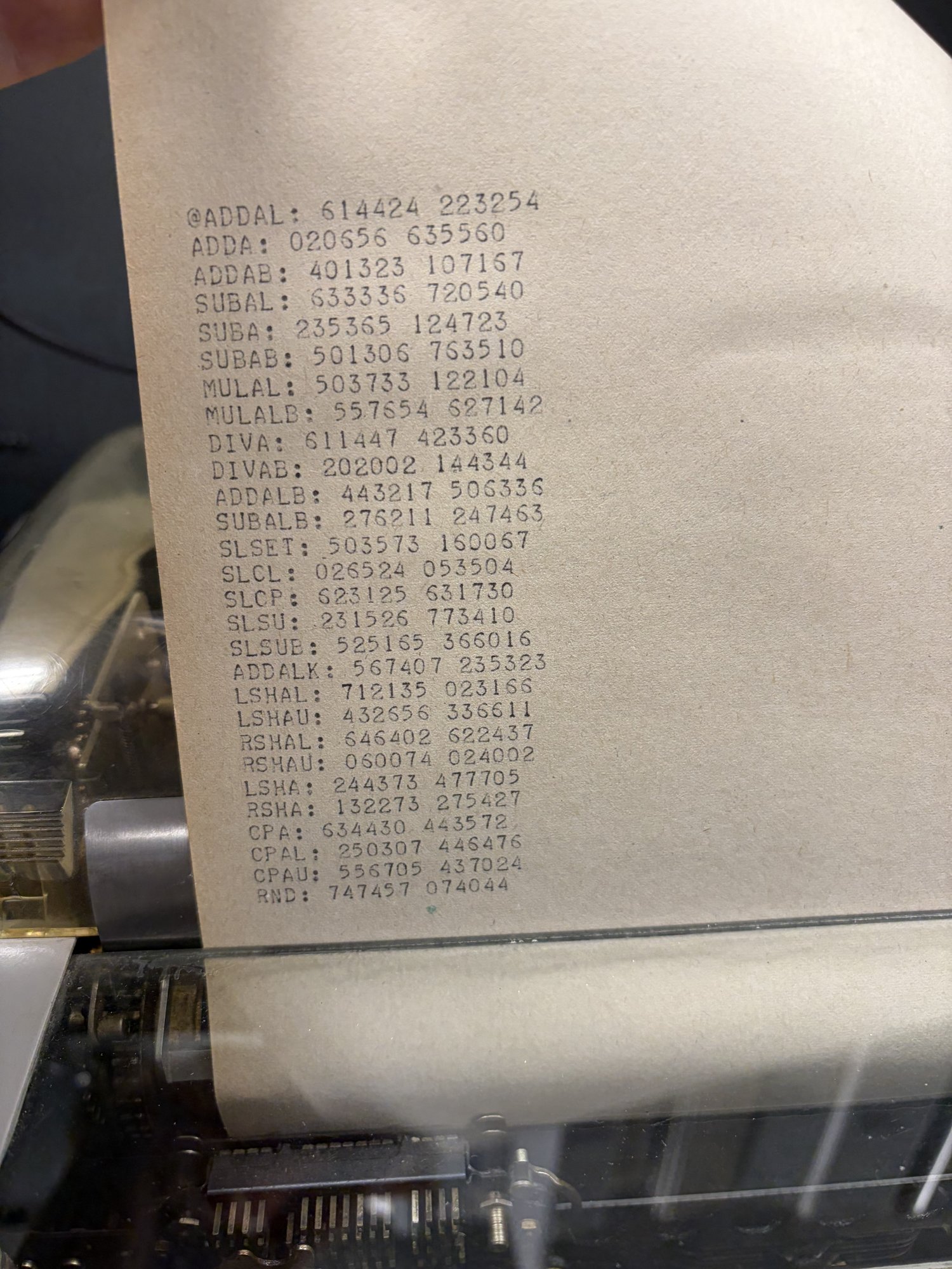
The fingerprinting program reports hashes for each instruction.
I sicced Claude Code on the hardware fingerprints and let it brute force various interpretations of the manual until we had something that matched.
After we fixed this emulator difference, we ran the asm pi program in the emu. And it printed the same garbage that we saw on the hardware!!! This means that our emulator is probably accurate now. I have never been so happy to see garbage!
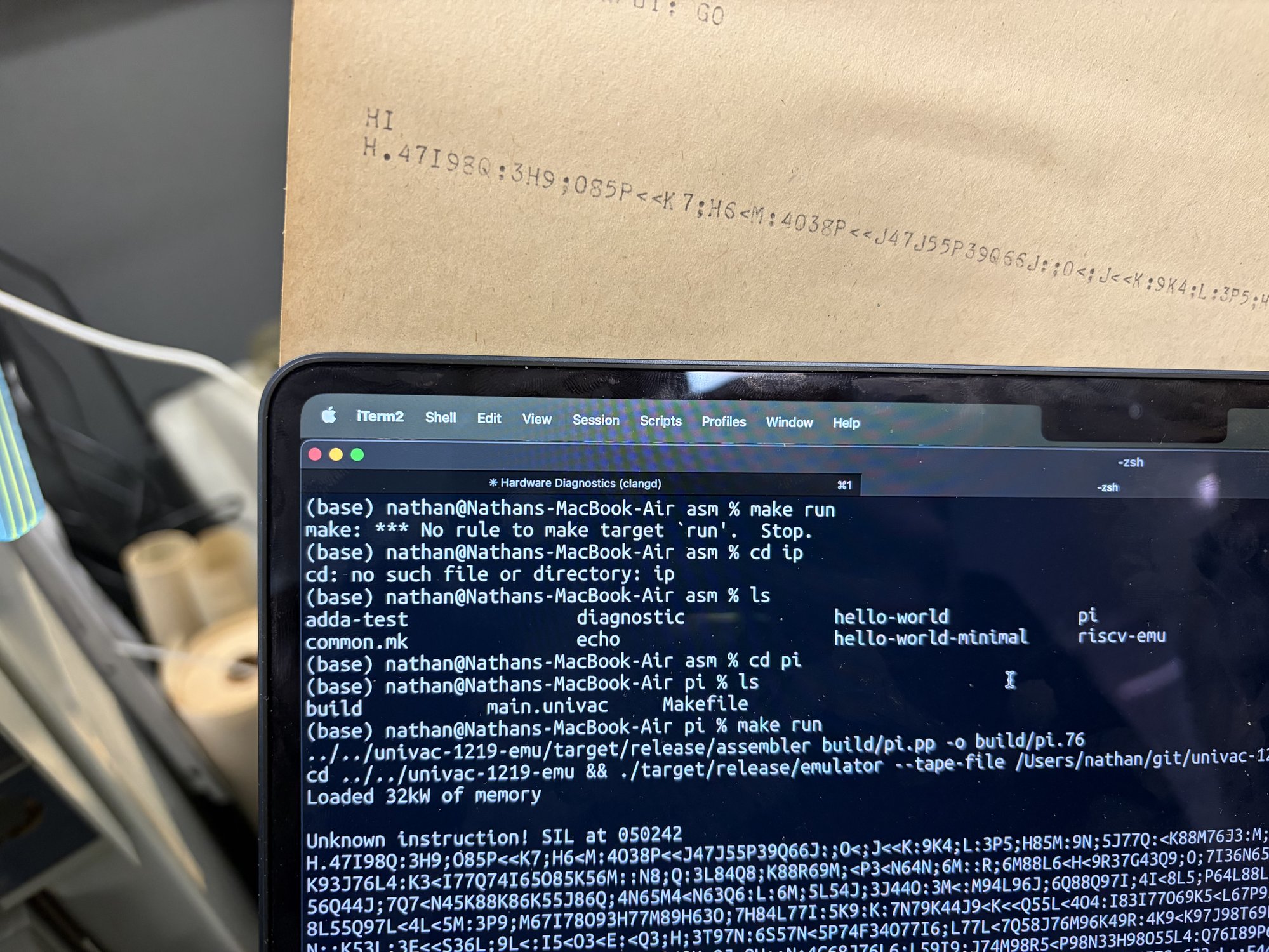
At this point we fixed the pi program and RISC-V emulator to work with the new interpretation of the 36 bit ops.
…and just like that, all of our programs worked. Hello world, fizzbuzz, Oregon Trail, BASIC, Figlet, ELIZA. A sudoku solver compiled from OCaml using C_of_ocaml. AES encryption. Baseball. Blackjack. Enigma encrypter and cracker. Wordle. All working! No need for the software tracer, even!
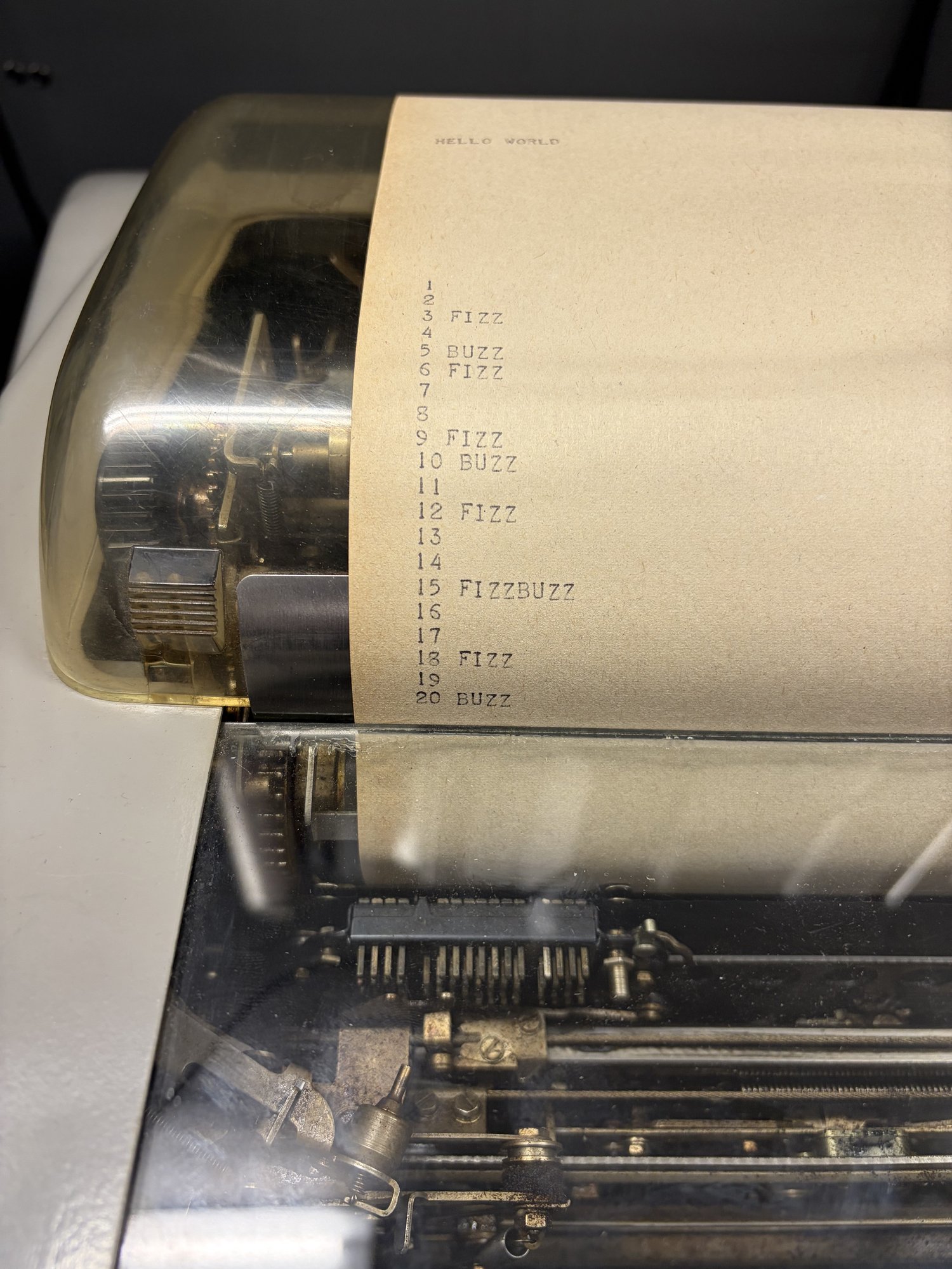
Hello world and fizzbuzz were the first C programs to work on the UNIVAC.
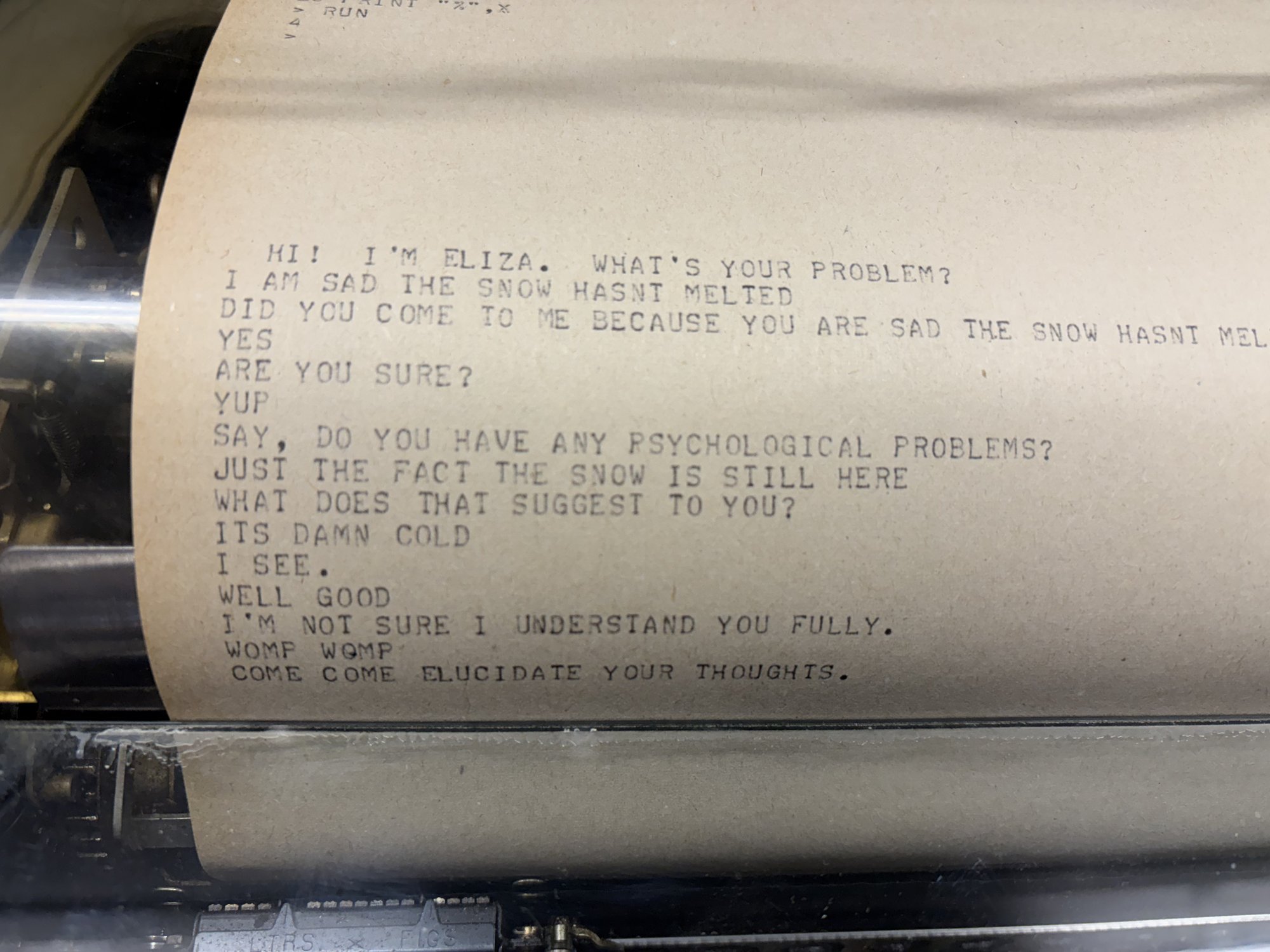
An ELIZA session. Come come, elucidate your thoughts.
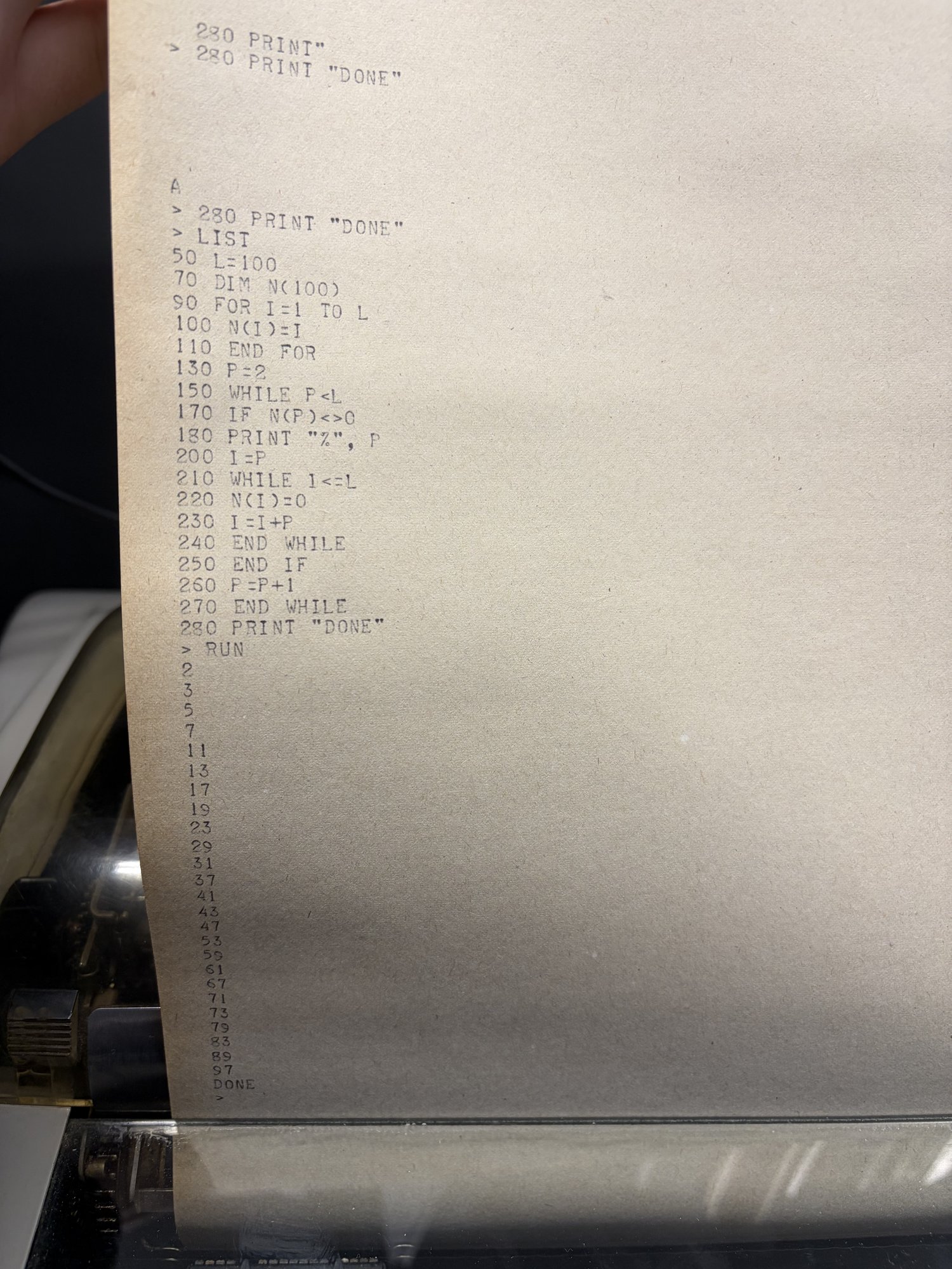
Interactive BASIC interpreter running a prime sieve program.
We started the NES emulator over lunch. We came back thrilled to see that it printed the first visible frame!
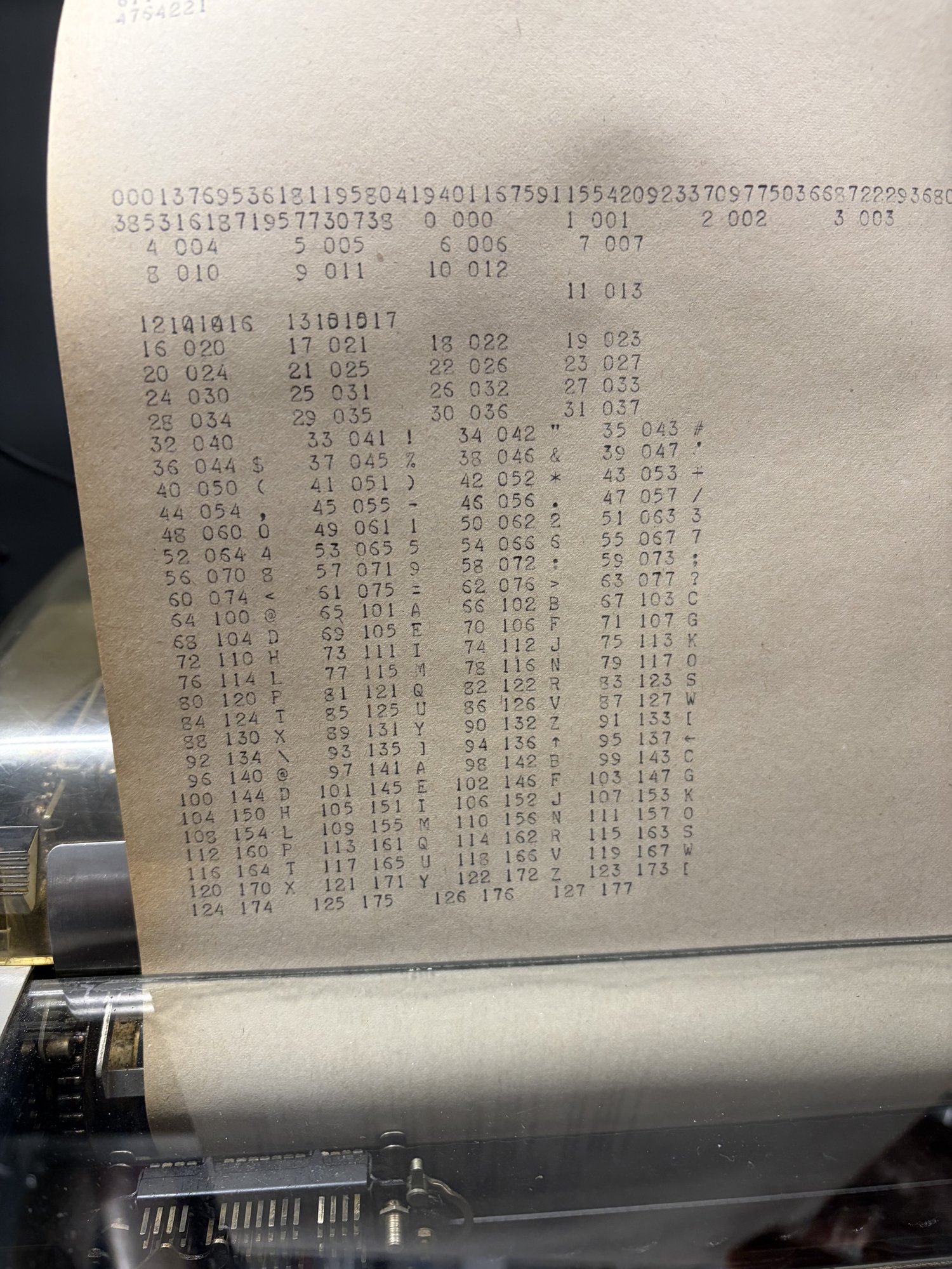
We also seized this opportunity to dump the full ASCII table to the teletype to learn its character set:
This trip was so successful that we had some time to try out my most ambitious goal of the whole project: can we host a Minecraft server? I brought a PoC that I knew worked in the emulator.
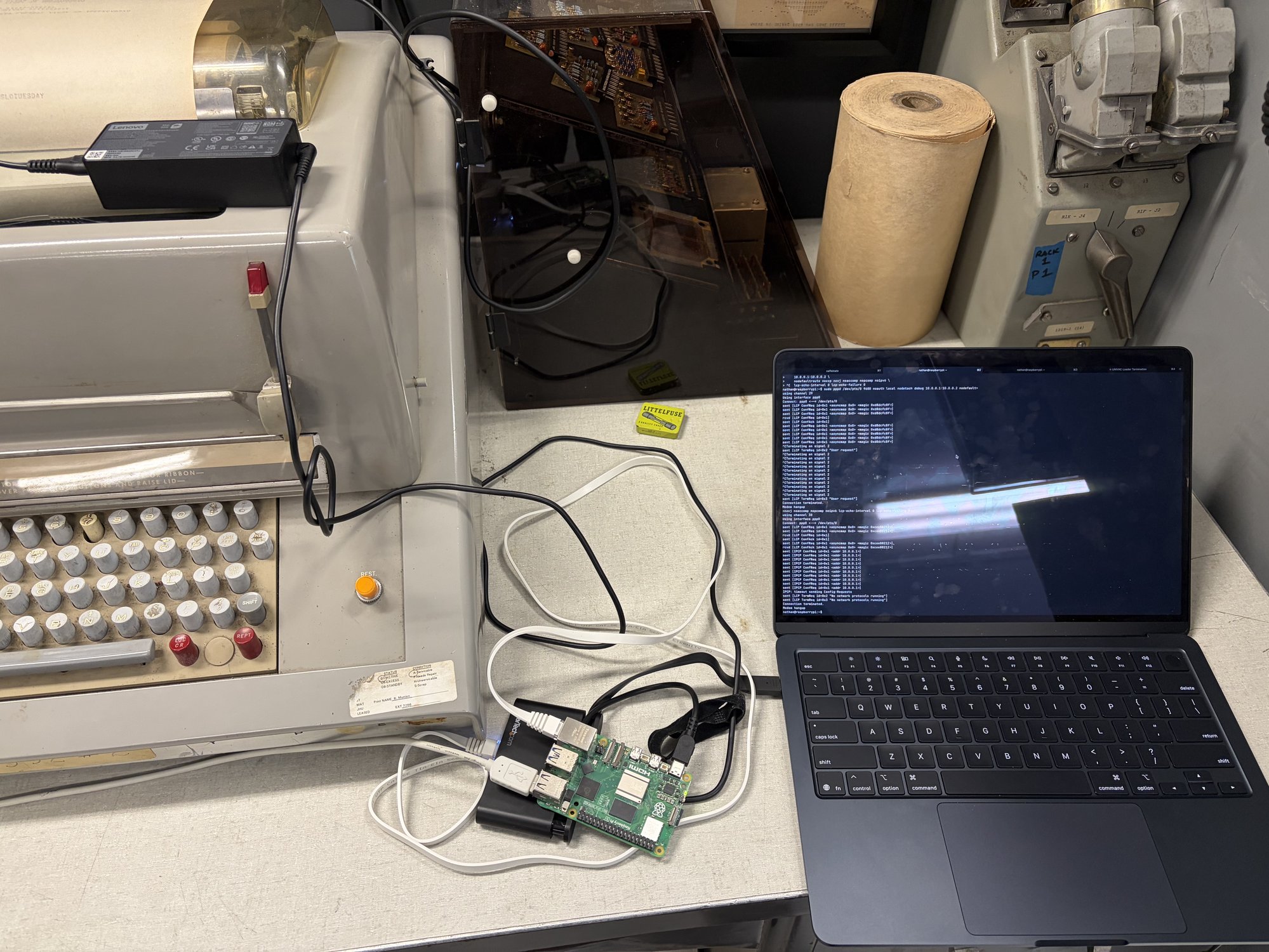
The network setup: a raspberry pi runs the pppd bridge between Mac and UNIVAC serial.
We got as far as a PPP and TCP handshake happening, but didn’t get data through end to end.
Networking on the UNIVAC
My initial dream was to get a NES emulator working on the UNIVAC. But ever since we had accomplished that, I set my sights higher to try and host a Minecraft server on the computer. This is my most cursed idea yet, very technically hard, and it requires all the tools and knowledge we have spent the last many months building.
It’s important to me that we don’t cheat anything, so let’s lay out our goals:
- For our PoC, I only care that our Minecraft client can login. So we only need to implement the Minecraft login protocol.
- All interesting logic must happen on UNIVAC. No cheating.
The approach is to forward IP packets to the UNIVAC via PPP, and the UNIVAC
itself implements all the PPP/IP/TCP/Minecraft protocols. In my setup, my Mac
laptop connects to a port on the pi which simply forwards IP packets via pppd
over serial to the UNIVAC. I’m pretty sure the Mac itself can directly run
pppd, but I’m most comfortable with Linux, so I had the pi as an intermediary.
But how is it possible for the UNIVAC to run all these protocols? I’m not even sure 90kb of memory is enough to store the code of a full TCP implementation, let alone run one.
Here’s the key idea: throw all error handling out of TCP. Assume that only one connection happens at a time, all packets arrive in full and in order, and suddenly TCP is extremely simple! As long as you turn TCP into UDP, you can run it on the UNIVAC.
The Minecraft login implementation is derived from bareiron. With all these pieces together, you should be able to log into a world without blocks and fall to your death before disconnecting.
So why didn’t it work in the previous visit? I hypothesized that the issue was that the UNIVAC was dropping incoming packets on the floor as it was writing its packets out. This would actually not be a problem if we had correctly implemented all the TCP error handling, but we didn’t, so it’s critical that we don’t let this happen.
Fixing this means that we have to get our hands dirty and understand the concurrent IO features of the UNIVAC. The UNIVAC’s IO interface is roughly DMA: the hardware writes the incoming bytes into the buffer in memory you point it to. The IO interface has a mode called “Continuous Data Mode”, or “CDM”. We can configure CDM to restart the DMA at the start of the buffer once the buffer is full.
This gives us a ringbuffer primitive. We can separately track the last byte that we read from our program, and so long as we don’t fall behind more than our 4kb buffer size, we won’t drop bytes on the floor even if we’re busy processing or sending data on another channel.
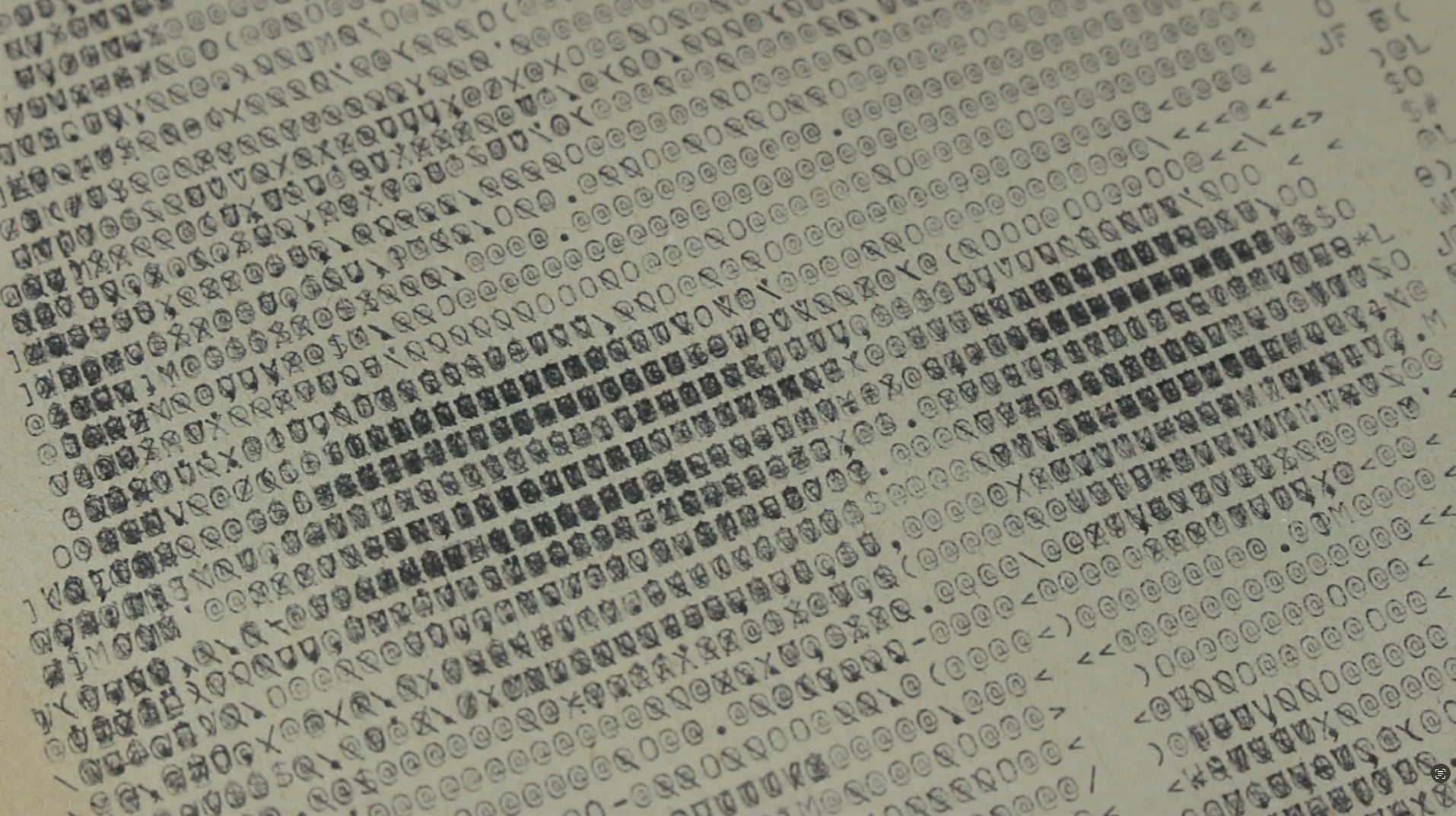
Overstrike selfie art on the TTY
In the downtime before we went back to the museum, TheScienceElf was working on improving the accuracy of the emulated TTY. He sent me a screenshot correctly showing the TTY typing over the same character at the end of the line, just like what we saw at the museum when we forgot to put newlines in our output:

I was with my partner at the time and we had the idea that if we could type over the same character many times, we could achieve higher resolution ascii art. More variables to control = higher resolution. (Unfortunately we would be 50 years too late to this idea)
On the model 35 TTY, when you want to go to the next line, you send a carriage
return (\r) followed by a newline (\n). \r moves the cursor back to the
left, and \n moves the cursor down one row. If you only send \r, you’re able
to type over the same line again, typing over what already was written.
I wrote a Python script that converts an image into a string of characters to send out to the teletype to do this. The algorithm is as follows:
- Render each printable Model 35 character into a bitmap of ink coverage.
- Divide the target image into a grid of cells, one per character position.
- For each cell, greedily pick the character that most reduces perceptual error. Repeat up to some max strikes per cell. If ink overlaps, then set pixel darkness according to Beer-Lambert (0.5 -> 0.75 -> 0.875). Edges detected in the image are weighted higher in error calculation.
- Spread residual error to neighboring cells via Floyd-Steinberg diffusion.
Take a close look at the image. You can see how several chars typed over each other contribute more darkness + texture:
Museum Visit #3: Minecraft, webserver, and a selfie
On our final trip to the museum, the UNIVAC came online right away with no hardware issues. I immediately had a good feeling about how the day was going to go.
We started the day by running a couple experiments that we brought with us:
- We tested all cases of add/sub with -0 and +0. This is when we confirmed that the UNIVAC deviates from the typical ones’ complement scheme by normalizing -0 to +0 in the non-carry path.
- We ran a memory check to confirm that we have exactly 40,960 words.
Then we ran some other programs we brought: TheScienceElf’s neat pi and Euler programs, my SHA-256 program, and Steven’s Battleship program all worked.
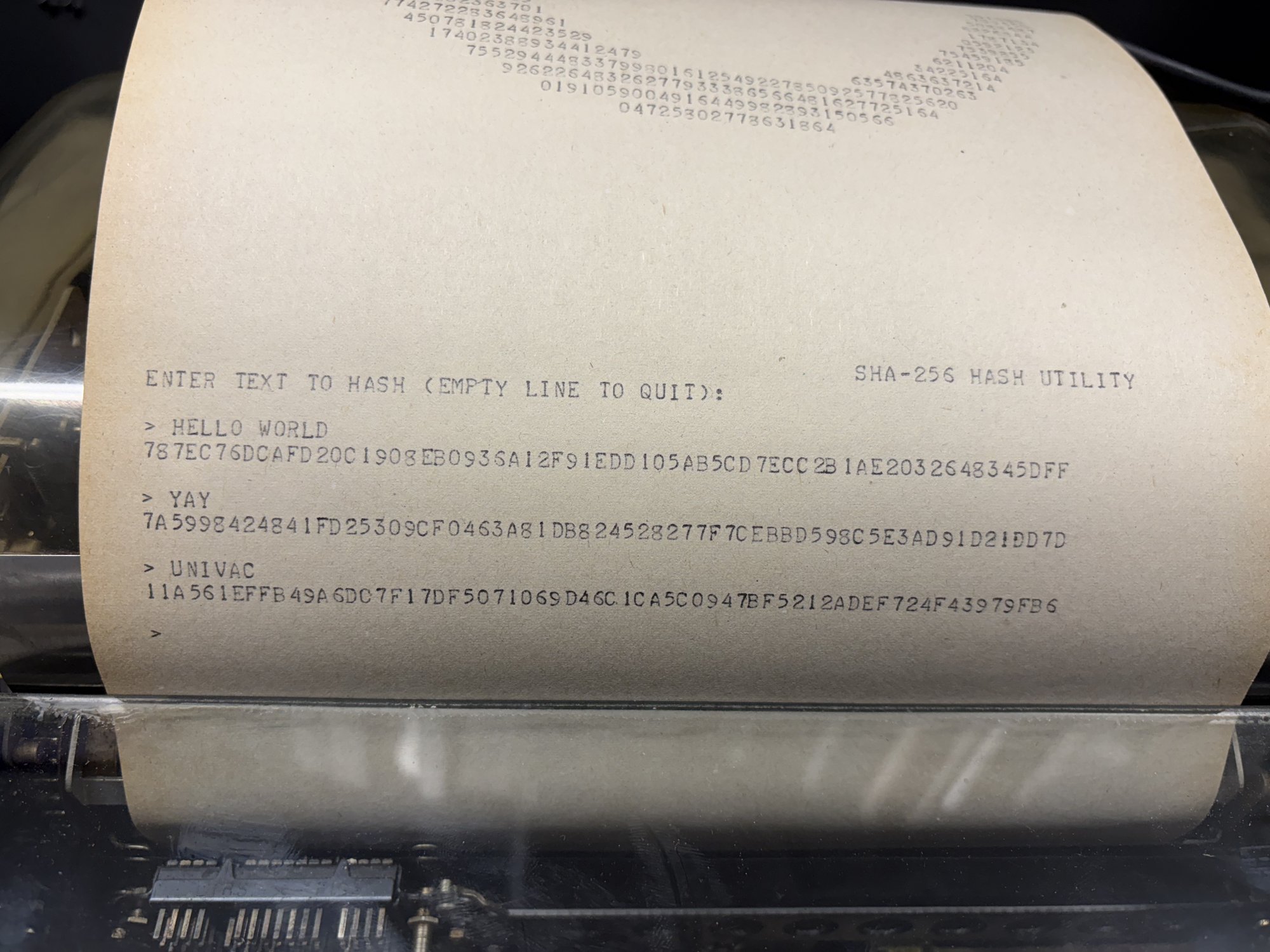
The SHA-256 utility hashing three inputs (HELLO WORLD, YAY, UNIVAC).
But now the moment of truth, will our concurrent IO changes work? Can we get Minecraft running?
As usual, we have to start simple and build up our primitives. I came prepared with a simple test program that printed the ringbuffer stats as it ran to confirm that my understanding of the manual was correct. And sure enough, it worked exactly like I expected over serial. The write pointer was circling through the buffer.
Next up for testing was our webserver program, since that was still simpler than Minecraft. I could feel myself getting nervous. We loaded it up and connected PPP… and no good! We couldn’t connect. My heart sank. It was lunch time, so we left to eat and brainstorm. But before we left, we kicked off the overstrike ASCII art program, which we expected to take 10s of minutes to print. The result looked great!
When we came back, we reloaded the webserver to just try again… and it just worked! Maybe we misconfigured it on the first attempt? I could curl no problem. I loaded on my browser and…
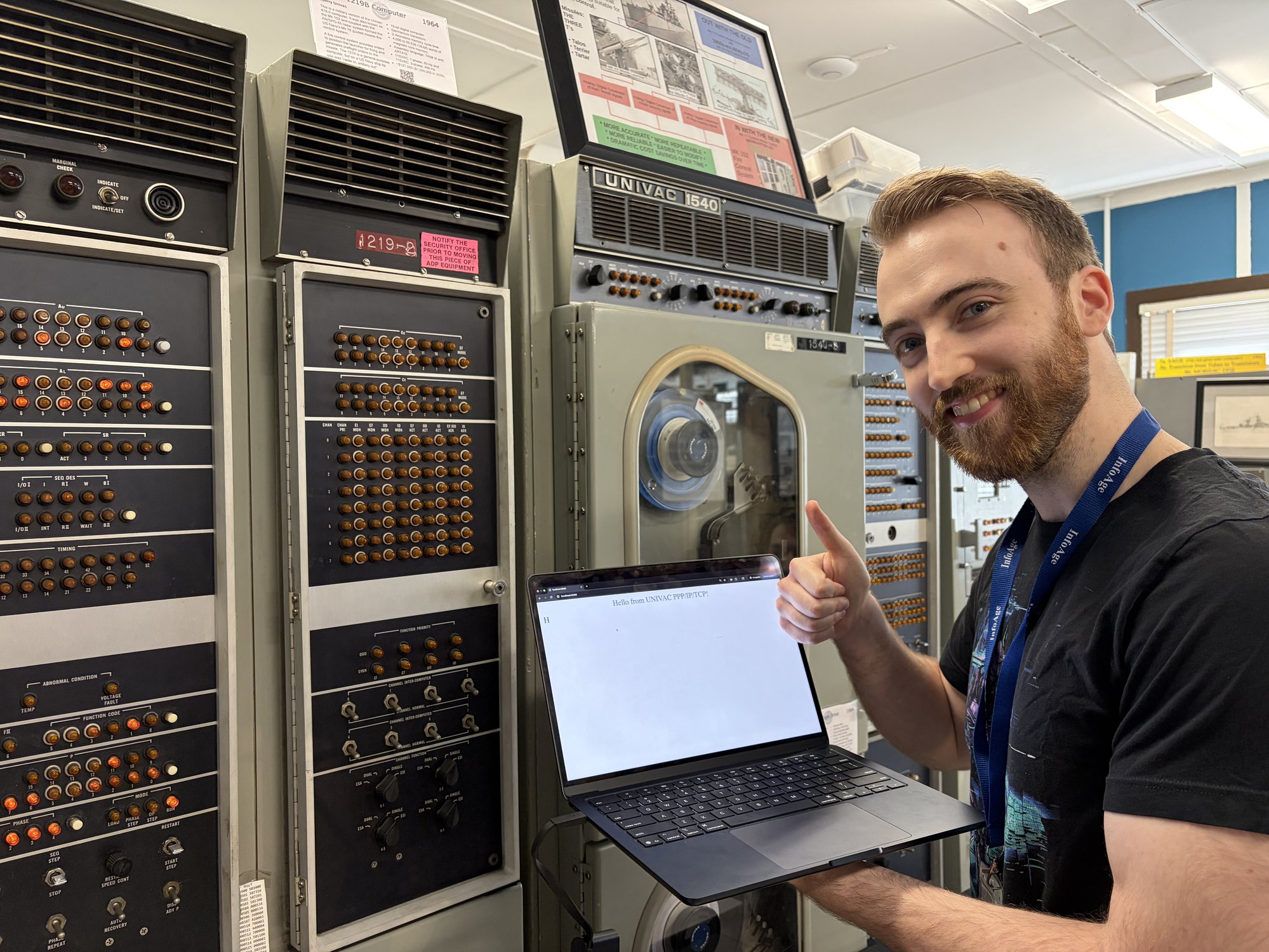
Unreal! This demonstrates PPP/IP/TCP all working over serial on the UNIVAC to serve a webpage that I fetched with my modern computer! I couldn’t believe it. (I don’t know why that extra “H” appears. I bet it has something to do with the additional request Chrome makes for “favicon.ico”. No idea :) )
Now for the moment of truth. What about Minecraft?
We loaded the program. I started up my Minecraft client. I pointed it to the UNIVAC IP and clicked connect. Sure enough, on the first try, we logged in!
I was over the moon. All these months of debugging + clever hacks and finally we did what was thought impossible (at least, TheScienceElf thought it was impossible :)).
We spent the rest of the afternoon running programs to get footage for the video and generally celebrating our accomplishments of the last 8 months.
Conclusion
What a wild ride. My favorite projects are the ones that I didn’t know were possible when I set off to go do them.
I enjoy the thought that everything we did here was technically possible 60 years ago. Can you imagine going back in time and dropping them a paper tape with these programs on it? They’d lose their minds!
Thanks so much to the people that made this possible: Duane, Bill, Steven, and TheScienceElf. Thanks to all the staff at VCF for allowing us to come out and have a great time with the computer! What an amazing experience.
Thanks for reading! Source is here.
Nathan pushes the buttons to start the Minecraft server on the UNIVAC, 2026 (colorized)